

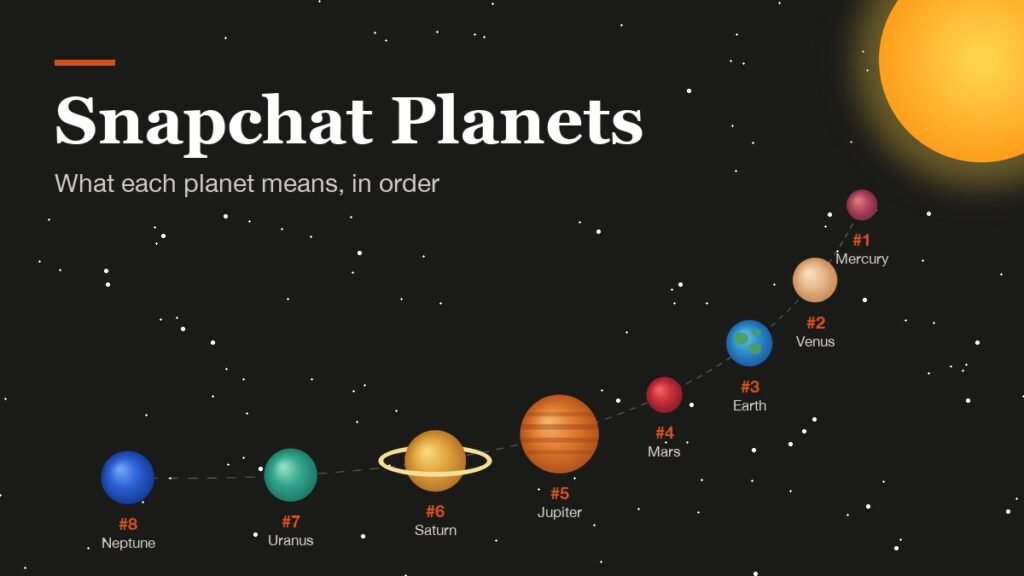
The Snapchat planets order is Mercury, Venus, Earth, Mars, Jupiter, Saturn, Uranus and Neptune, and it maps straight onto a friend’s Best Friends list: Mercury is first and Neptune is eighth. The planets belong to Solar System, a feature for Snapchat+ subscribers that shows where you rank with each friend.
It is simple once you know two rules. The planet is your spot in their list rather than the other way round, and Snapchat has shipped the feature switched off since April 2024. Here is what each planet means, how the ranking is built, and how to get the planets to show up.
Snapchat Planets Order, One Through Eight
Count outward from the Sun, which stands for the friend whose profile you are looking at:
- Mercury: you are their number one, the person they Snap and Chat with most.
- Venus: second on their list.
- Earth: third, and the only planet drawn with a moon.
- Mars: fourth, and the last planet decorated with hearts.
- Jupiter: fifth, drawn as the biggest planet with orange bands.
- Saturn: sixth, easy to spot by its glowing ring.
- Uranus: seventh, a teal-green planet.
- Neptune: eighth, the final spot on their Best Friends list.
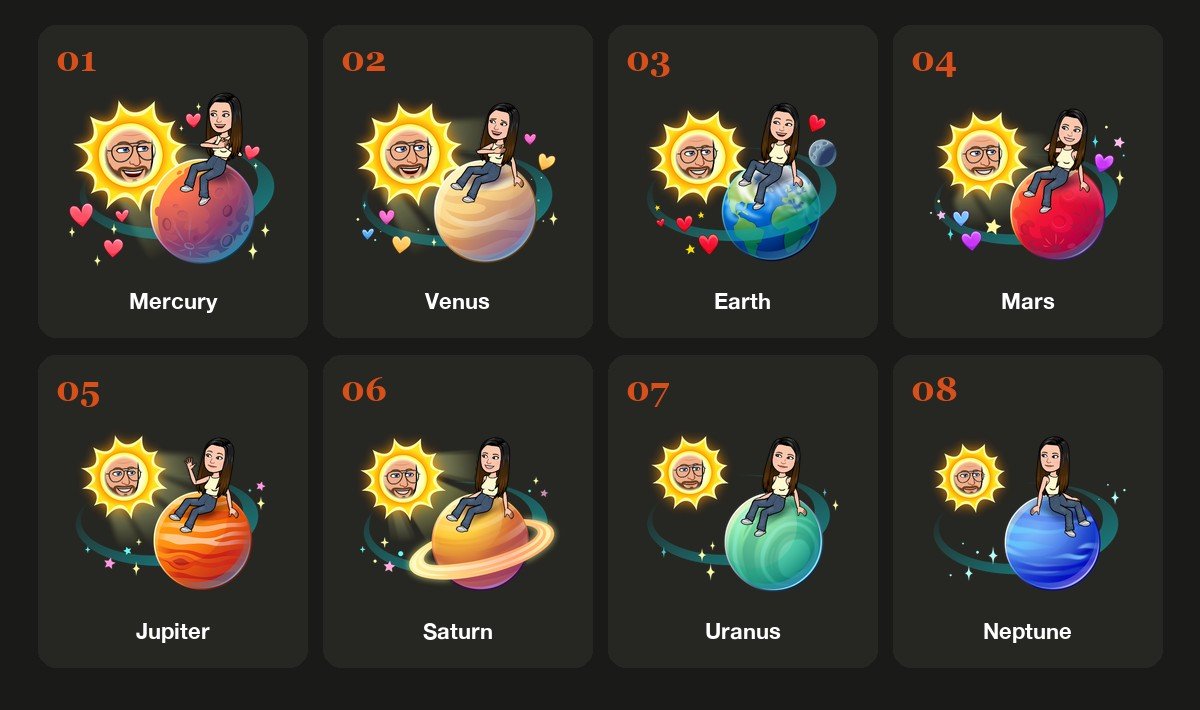
Hearts or Sparkles: Reading the Snapchat Planet Art
Each planet appears as a Friendmoji, with one Bitmoji as a smiling Sun and the other perched on the planet. The decoration changes halfway down the list. Mercury, Venus, Earth and Mars are surrounded by hearts, while Jupiter, Saturn, Uranus and Neptune get sparkles and small stars instead. Any heart-covered planet puts you in that person’s top four.
The rest follows the textbook. Jupiter is the largest, Saturn keeps its ring, and Earth carries a small grey moon, which makes those three easy to recognise before you even read the label.
How Snapchat Works Out Which Planet You Are
Solar System reads straight from Best Friends, the list of up to eight people each user Snaps and Chats with most. Snapchat refreshes that list regularly and does not say how Snaps and Chats are weighted, so the only thing that reliably moves you up is more back-and-forth with that person.
Because every list is built from its owner’s activity, a planet only works in one direction. You can be Mercury to a friend while they sit at Uranus on your side, or while they are missing from your list entirely. Even My AI can claim a Best Friends spot if someone chats with it enough, pushing real friends down a planet. Snapchat’s green dot behaves the same way: it reports what happened in the app, not what anyone meant by it.
The Best Friends Badge and the Old Friends Badge
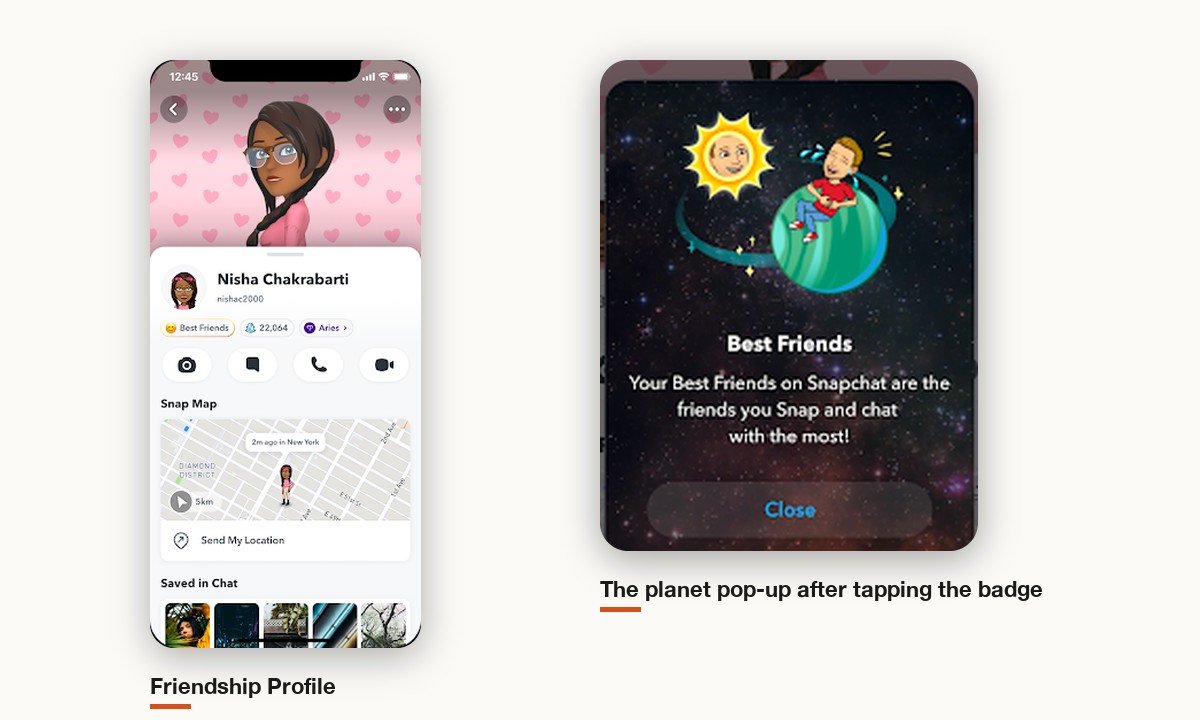
The planet hides behind a small badge on the Friendship Profile, the screen you reach by tapping a friend’s name in Chat. It is a different thing from a public profile on Snapchat, which is about being discoverable to strangers.
Snapchat first used two badge labels. Best Friends meant you are in each other’s top eight; Friends meant you are in their top eight but they are not in yours. Today Snapchat describes just one badge, Best Friends with a gold ring, which suggests the one-way Friends version may no longer appear. No badge at all means you are outside their top eight.
How to Turn On Solar System in Snapchat+
Solar System needs Snapchat+, or one of the higher Lens+ and Platinum plans that include it. The US App Store lists the Snapchat+ monthly plan at $4.99, and the price varies by country and device. After subscribing:
- Open your profile from the Bitmoji icon at the top left of the camera.
- Tap the Snapchat+ membership card.
- Scroll the feature list to Solar System and switch it on. It is off by default for first-time subscribers.
- Open a friend’s profile from Chat and press the gold-ringed Best Friends badge.
That opens a pop-up with your planet on it. To hide planets again, flip the same toggle off; nothing else about your subscription changes. The menu is laid out the same way on iPhone and Android.
Snapchat+ Plans That Unlock the Planets
Solar System is one of more than thirty extras in the base Snapchat+ plan, listed alongside #1 Best Friend, Extended Best Friends List, Story Rewatch and custom app icons. Snapchat also sells larger bundles, and each one includes the full Snapchat+ list:
- Snapchat+: the entry plan and the cheapest route to planets.
- Lens+: Snapchat+ plus a catalogue of exclusive Lenses.
- Platinum: Snapchat+ without Sponsored Snaps or Story and Lens ads.
- Friends & Family Plan: the subscriber plus up to two friends who do not already pay.
You can buy any of them in the app or on the web at snapchat.com/plus. Phone purchases are billed by the App Store or Google Play and cancelled there; web purchases are managed under Accounts, then My Subscription, on snapchat.com. Removing the app from your phone does not end either kind.
How to Move Up in Someone’s Solar System
There is no setting that changes your planet. The only lever Snapchat describes is activity: Best Friends are the people someone Snaps and Chats with most, so trading more Snaps and Chats with that friend is what moves you inward over time.
Pinning does not help here. The Snapchat+ #1 Best Friend pin reorders your own list, is visible only to you, and has no bearing on their Solar System. Neither does checking their profile repeatedly; viewing the badge is not a Snap or a Chat.
The 2024 Change That Hid Snapchat Planets
Solar System used to be on for every subscriber. A Wall Street Journal report in early April 2024 described the rankings feeding anxiety among teenagers, and said that finding out you were not someone’s number one had led to tough conversations and even breakups. Within a week, Snap switched the feature to opt-in rather than removing it.
Snap said it wanted to keep the feature for the people who enjoy it without upsetting those who do not, and added that fewer than 0.25% of its community used it. That number is small largely because only Snapchat+ members could ever see planets.
No Snapchat Planet Showing? Check These Five Things
Work down this list before assuming you have been dropped:
- Your subscription. Planets vanish the moment Snapchat+ lapses.
- The Solar System toggle. A fresh subscription leaves it off until you switch it on.
- Their top eight. Only eight Best Friends get planets, so ninth place shows nothing.
- Recent activity. The list refreshes regularly and a quiet stretch can move you out.
- My AI. A friend who chats with the bot a lot may have given it one of the eight spots.
- A fresh subscription. Snapchat notes the app may need a restart before new Snapchat+ options show up.
What a Snapchat Planet Does Not Tell You
A planet answers one narrow question, and people often read more into it than it holds:
- Who else is on the list. You only ever see your own planet, never who holds the other seven.
- How they rank you back. Their list and yours are separate; Mercury on their side can mean nothing on yours.
- How close you really are. It counts Snaps and Chats, so a friend you see every day but rarely message can rank you low.
- Anything permanent. The list refreshes regularly, so a planet is a snapshot of recent weeks, not a verdict.
Frequently Asked Questions
What does Mercury mean on Snapchat?
Mercury means you are first on that friend’s Best Friends list, the person they currently Snap and Chat with most. It reflects app activity and can change as their habits change.
What does Neptune mean on Snapchat?
Neptune is the eighth and last planet, so you are the eighth person on their Best Friends list. You are still inside their top eight; anyone below that gets no planet.
Do both people need Snapchat+ to see planets?
No. Only the person looking needs Snapchat+ with Solar System switched on. The friend whose profile you open does not have to subscribe, because the planet comes from their Best Friends list, which every account has.
Can I see my own Solar System on Snapchat?
No. The planets only show where you sit in other people’s lists. Snapchat puts your own Best Friends first on the Send To screen and lists them in your profile’s Chat section instead.
Do Snapchat planets work on Android?
Yes. Snapchat+ is sold on both Android and iPhone, with billing through Google Play or the App Store, and Solar System is part of the same Snapchat+ feature list on each platform.
Why did my Snapchat planet change?
Because their Best Friends list changed. Snapchat updates it regularly based on who they Snap and Chat with most, so a busy week with someone else can move you down a planet or out of the eight.
Related Articles

Get the Fox Bulletin briefing
The stories that matter, in your inbox. No spam, unsubscribe anytime.
Newsletter signup will be available soon.
Related stories
Morse Code: The Full Chart, Timing and How It Works
Every letter, digit, punctuation mark and procedural signal in international Morse code, with the timing rules that govern them and the places the code is still working.
Military Alphabet: All 26 Letters, Spelled and Pronounced
Alfa, Bravo, Charlie: the military alphabet is a set of 26 code words that keep letters apart over a noisy radio. Here is every letter, how to say it, and the history behind the list.
How to Turn Off Read Receipts on Instagram DMs
The global switch does not sweep up chats you have already set by hand. That one rule explains almost every case of Seen still appearing.