

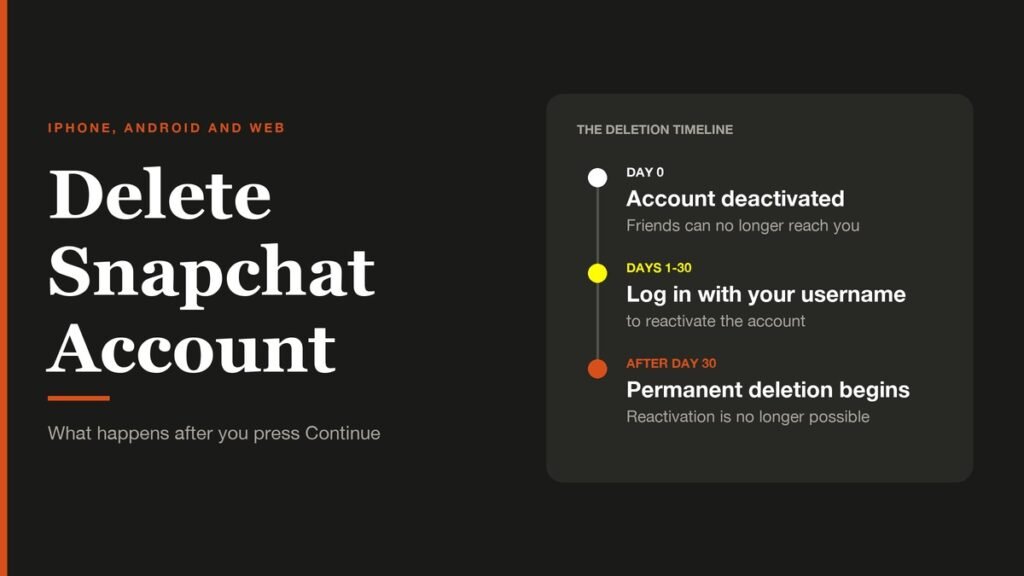
You can delete your Snapchat account from the iPhone app or from any web browser, and on Android the browser is the only way. Either route ends on the same page of Snapchat's accounts portal, where you confirm with your password. The account is then deactivated, not erased, and you have 30 days to change your mind.
This guide walks through each route with screenshots, plus the backup to make first. Expect five minutes for the deletion itself and longer for the data export if you want a copy of your Memories and chats.
The Short Answer
Quick version: on iPhone, open your profile, tap the gear, scroll to Account Actions and tap Delete Account. On Android or a computer, sign in at accounts.snapchat.com and choose Delete my account. Enter your password, tap Continue, and the account is deactivated for 30 days before permanent deletion.
Before You Delete: Save Your Data and Stop Snapchat+
Deleting an account takes your Snaps, Chats, Memories, Friends list and Snapstreaks with it. Two jobs are worth doing first.
- Your password. The final step asks for it. If you have forgotten it, reset it on the accounts portal before you start, because you cannot change it once the account is deactivated.
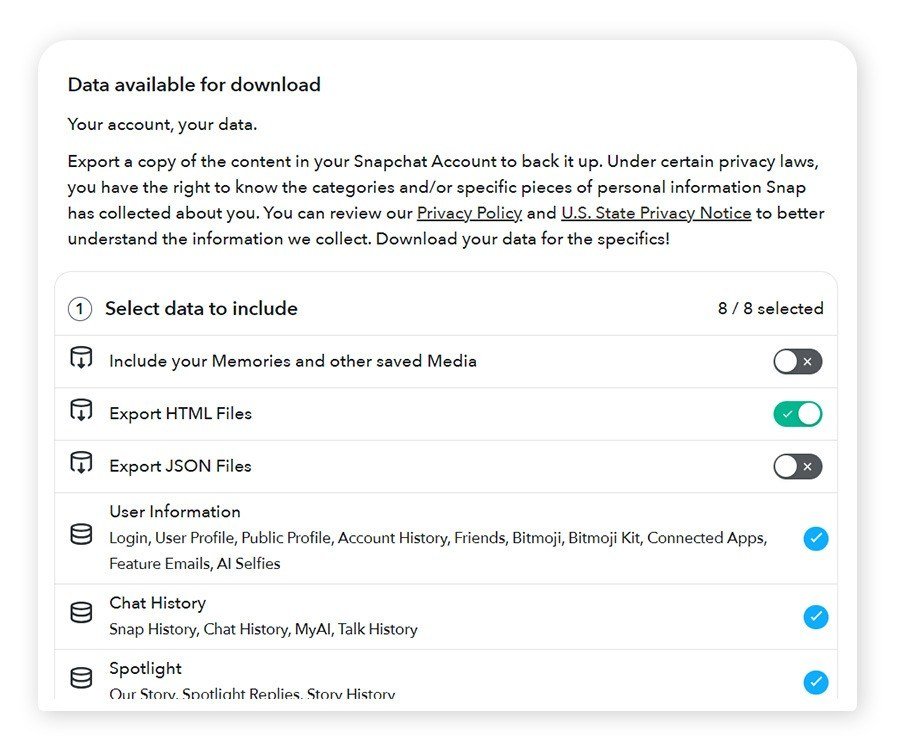
- A copy of your data. Snapchat's Download My Data tool, described in its privacy policy, exports your Memories, chat history and account details.
- Any Snapchat+ subscription. If you pay through the App Store or Google Play, the subscription is billed by that store. Cancel it there first; Apple explains how to cancel a subscription from Apple.
How to download your Snapchat data
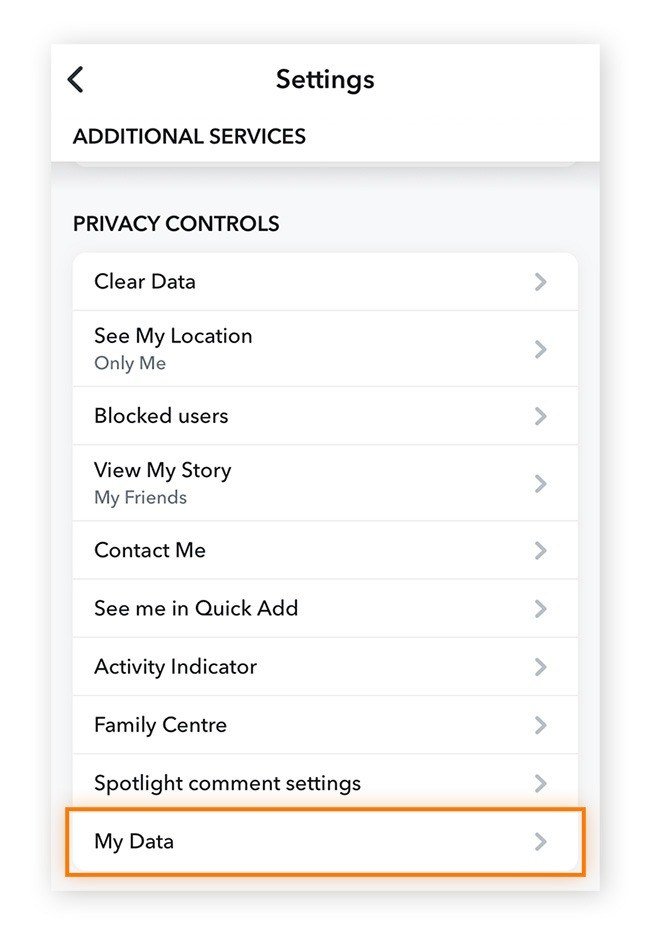
- Open your profile, tap the gear and scroll to Privacy Controls.
- Tap My Data. Check: a Download My Data page opens.
- Choose what to include. Turn on Include your Memories and other saved media if you want your photos and videos, and pick HTML, JSON or both.
- Set a date range if you only need part of your history, confirm your email address and tap Submit. Check: the page shows an export in progress, and Snapchat emails you when the file is ready.
Wait for that email before you delete. Exports can take hours or days, and Snapchat only gives you 30 days after deactivation to download your data.
How to Delete Your Snapchat Account on iPhone
The iPhone app is the only version with a delete button inside it. It hands you over to the accounts portal for the last steps.
- Open Snapchat and tap your profile icon or Bitmoji in the top-left corner.
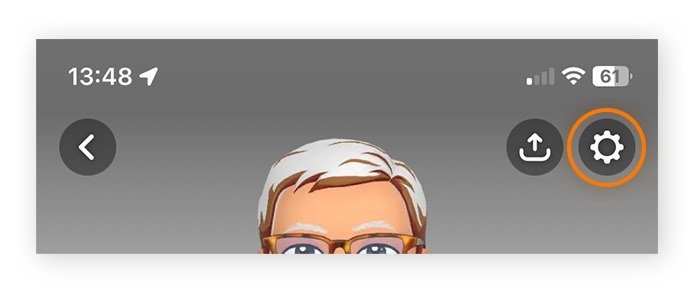
- Tap the gear in the top-right corner to open Settings.
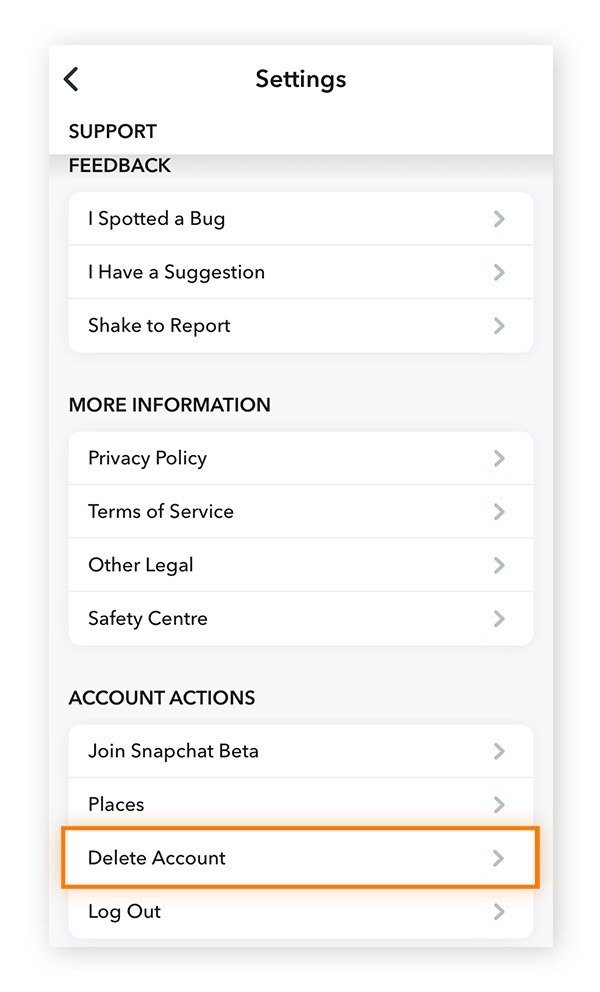
- Scroll down to Account Actions.
- Tap Delete Account. Check: Snapchat opens the accounts portal.
- Sign in to the accounts portal if it asks.
- Enter your password on the Delete Account page and tap Continue. Check: an Account deactivated message appears.
How to Delete a Snapchat Account on Android or a Computer
Snapchat's Android app has no delete option, so Android users and anyone on a laptop use the web. A phone browser works as well as a computer.
- Go to the Snapchat accounts portal and log in with your username or email and password.
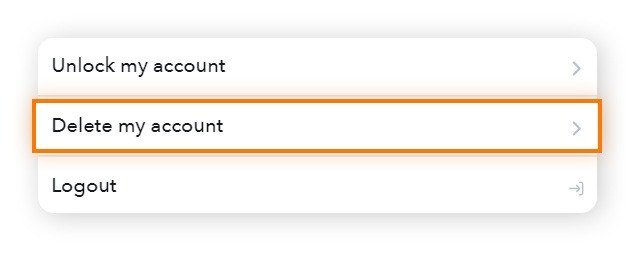
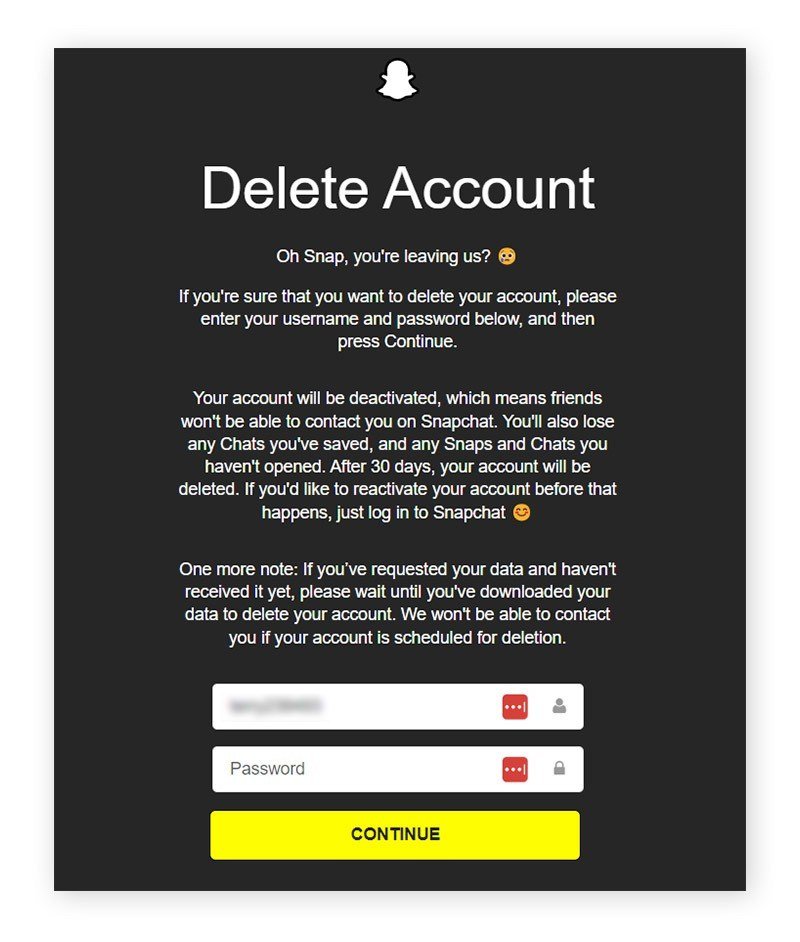
- Choose Delete my account from the list of options. Check: the Delete Account page loads with a warning about what will be lost.
- Enter your password. The username box is usually filled in already.
- Tap Continue.
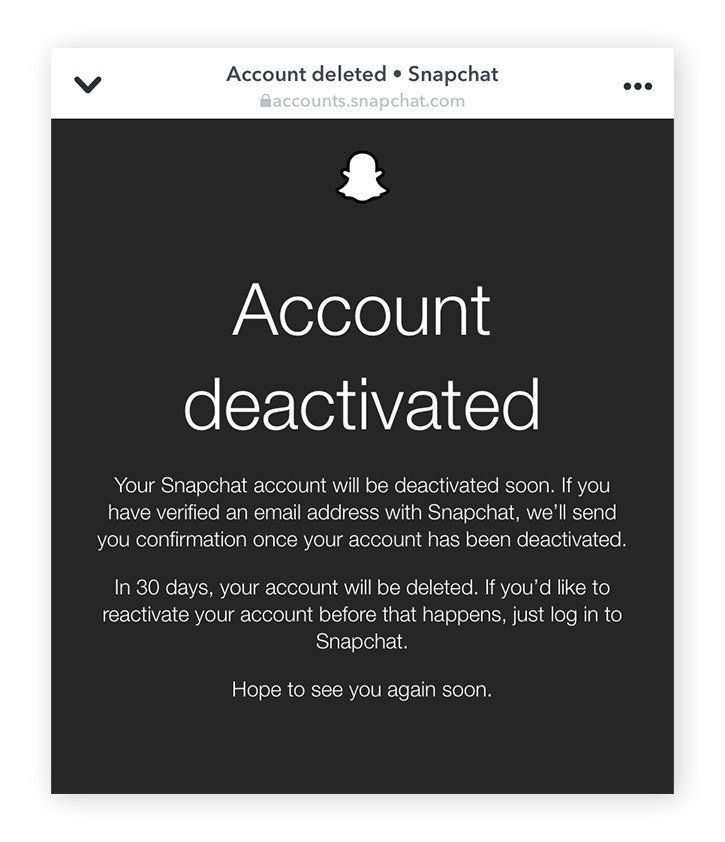
Check: the page changes to Account deactivated. If you have a verified email address on the account, Snapchat also sends a confirmation there.
What Happens After You Delete Your Snapchat Account
- Days 1 to 30: the account is deactivated. Friends cannot contact you, and you can still bring the account back.
- After day 30: the account moves to permanent deletion and can no longer be reactivated.
- Your data: you have 30 days to download it. If you do not, Snapchat permanently deletes it after 60 days.
- In India: the account is still deactivated for 30 days, but permanent deletion follows 180 days later, and data is deleted after 210 days.
Snapchat keeps some records even after deletion for legal, security and business reasons, such as purchases you made and when you accepted its terms.
How to reactivate a deleted Snapchat account
Open the Snapchat app within 30 days and log in with your username and password. Your email address and phone number do not work as logins while the account is deactivated, and Snapchat Support cannot reactivate it for you.
Delete, Uninstall or Log Out: What Each One Does
Three actions get mixed up, and only one of them removes the account.
| Action | Account still exists | Friends can contact you | Can be undone |
|---|---|---|---|
| Uninstall the app | Yes | Yes | Reinstall and log in |
| Log out | Yes | Yes | Log back in |
| Delete the account | Deactivated for 30 days | No | Log in with your username within 30 days |
If what you want is less Snapchat rather than none, logging out or uninstalling keeps everything intact for later. Deleting is the only option that ends with your data being erased.
If You Only Want Some Data Gone
You do not have to close the account to remove specific things. Snapchat's privacy policy lists content you can delete inside the app, including items saved to Memories, content shared with My AI and Spotlight submissions. The Settings screen also has a Clear Data option under Privacy Controls, next to the My Data export used above.
- Old photos: delete them from Memories one by one or in a multi-select.
- My AI conversations: content you shared with My AI can be deleted on its own, without touching the account.
- Your profile details: edit your name, birthday, email address and phone number in Settings.
If you cannot log in to delete the account
Deletion always ends with a password check, so a lost password has to be fixed first. Use the reset option on the accounts portal with the email address or phone number on the account. If the account is locked rather than forgotten, use the Unlock my account option that sits above Delete my account on the portal, then come back to delete.
Common Mistakes When Deleting Snapchat
- Uninstalling the app instead. Removing Snapchat from your phone does not touch the account. Your profile stays visible until you delete it on the portal.
- Logging back in by habit. Opening Snapchat during the 30 days reactivates the account, which restarts the whole process.
- Forgetting the subscription. A Snapchat+ plan billed by Apple or Google is managed in that store, so check it there.
If you want a lighter break rather than a full exit, Snapchat's visibility settings may be enough. Our guides to the Snapchat public profile and to what the green dot means on Snapchat cover what other people can see.
Frequently Asked Questions
Can I delete my Snapchat account without the password?
No. The last step asks for it. Reset the password on the accounts portal first, using your email or phone number, and then delete the account.
Does deleting Snapchat delete my messages from other people's phones?
Deleting the account removes your account data, but anything a friend saved or screenshotted on their own device is outside your account and stays with them.
How long does Snapchat take to delete an account?
The account is deactivated immediately and can be restored for 30 days. After that, permanent deletion follows. Users in India have a longer retention period before the account is erased.
Can I get my Snapchat account back after 30 days?
No. Once the 30-day window closes, the account is scheduled for permanent deletion, and Snapchat says permanently deleted accounts cannot be reactivated at all.
Related Articles

Get the Fox Bulletin briefing
The stories that matter, in your inbox. No spam, unsubscribe anytime.
Newsletter signup will be available soon.
Related stories
Second Monitor Not Detected? Fixes for Common Multi-Monitor Problems
A second monitor that shows no signal is usually a cable, input or display mode problem. Here is the fix for that and every other common multi-monitor headache.
How to Scan Mac for Malware: A Complete Step-by-Step Check
Macs scan themselves, but not on demand. Here is how to check a Mac for malware by hand, which free tools help, and the 2026 copy-paste scam to watch for.
How to Split Screen on iPad: Side by Side, Slide Over and More
Split screen on iPad now lives inside Windowed Apps. Here is how to put two apps side by side, resize them, float a third in Slide Over and go back to one app.