

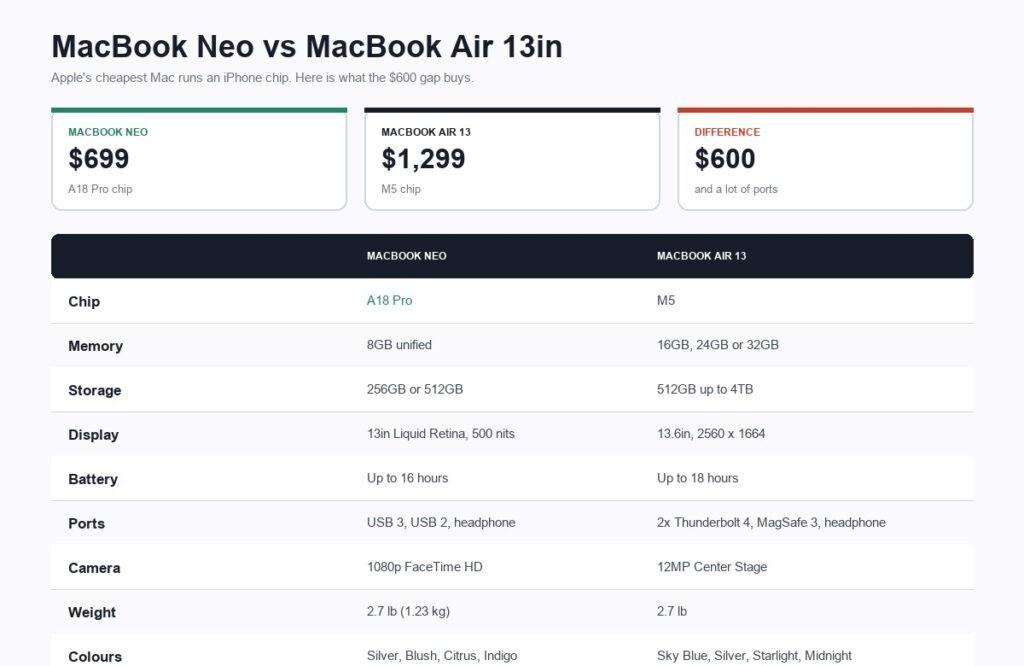
MacBook Neo is the cheapest laptop Apple has ever sold, starting at $699, or $599 with education pricing. It is a 13-inch aluminium Mac in four colours with a Liquid Retina display, 16 hours of battery life and macOS, and by any ordinary measure that price should not be possible.
The way Apple got there is the most interesting decision in the machine. MacBook Neo does not run an M-series chip. It runs the A18 Pro, the same family of silicon Apple puts in iPhones, and that single choice explains the price, the performance, the memory and most of the trade-offs below. This guide covers the full specification, what the A18 Pro actually means in a laptop, how the Neo compares with the $1,299 MacBook Air, and who should and should not buy one.
MacBook Neo Price and Configurations
| Configuration | Price |
|---|---|
| 256GB SSD, 8GB unified memory | $699 |
| 512GB SSD, 8GB unified memory | $799 |
| Education pricing | From $599 |
| Monthly | From $58.25 a month for 12 months |
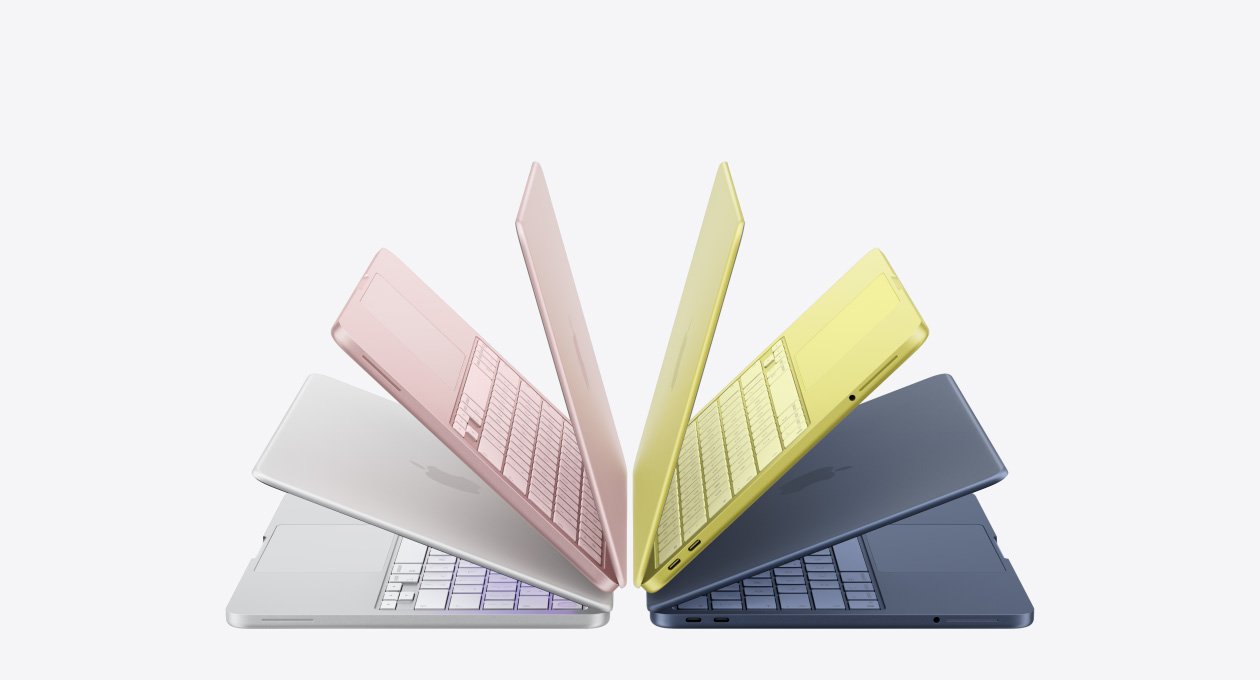
Both configurations have 8GB of unified memory, so the only decision is storage. Colours are Silver, Blush, Citrus and Indigo, with colour-matched keyboards, and Apple describes it as the most colourful MacBook lineup it has made.
Full Specifications
Every figure below is from Apple’s published technical specifications.
| Specification | MacBook Neo |
|---|---|
| Chip | Apple A18 Pro |
| Display | 13-inch Liquid Retina, LED-backlit IPS |
| Resolution | 2408 by 1506 at 219 pixels per inch, 3.6 million pixels |
| Brightness | 500 nits, one billion colours |
| Unified memory | 8GB |
| Storage | 256GB or 512GB SSD |
| Battery life | Up to 16 hours |
| Ports | One USB 3 (USB-C), one USB 2 (USB-C), 3.5 mm headphone jack |
| Camera | 1080p FaceTime HD |
| Audio | Dual side-firing speakers, Spatial Audio with Dolby Atmos, dual-mic array with beamforming |
| Security | Touch ID or Lock Key depending on model |
| Weight | 2.7 pounds (1.23 kg) |
| Thickness | 0.50 inch (1.27 cm) |
| Colours | Silver, Blush, Citrus, Indigo |
| Price | From $699 |
An iPhone Chip in a Laptop
The A18 Pro is a phone processor. Apple says on its own product page that it “breezes through your go-to apps and AI activities, putting power and efficiency at your fingertips”, and the comparison module on that page lists MacBook Neo with the A18 Pro directly against MacBook Air with the M5.
This is less strange than it sounds. Apple silicon in phones and Macs has shared an architecture for years, and an A18 Pro is comfortably faster than the Intel processors in MacBooks that people were happily using not long ago. For email, a browser with a reasonable number of tabs, video calls, documents, spreadsheets, presentations and streaming, it is more than sufficient.
What an A-series chip brings with it is the constraint that defines this machine: 8GB of unified memory, with no option to increase it. Phone chips are built around phone memory configurations. That is fine for the workloads above and becomes a real ceiling for anything that wants to hold a lot in memory at once, such as large photo libraries, video editing, dozens of browser tabs alongside heavy apps, or virtual machines.
It also means Apple Intelligence runs on device, which is the reason Apple can market a $699 laptop as a platform for AI at all.
The Display, Build and Ports
The 13-inch Liquid Retina panel runs at 2408 by 1506, which works out at 219 pixels per inch and 3.6 million pixels, with support for one billion colours and 500 nits of brightness.
That 500-nit figure is the one to note. It is bright enough indoors and adequate near a window, and it is dimmer than the panels in more expensive MacBooks. Working outside on a bright day is where you will feel the difference.
The enclosure is recycled aluminium, and Apple makes an unusually specific environmental claim about it: 60 percent recycled content by weight, which it describes as the most in any Apple product, including 90 percent recycled aluminium. It weighs 2.7 pounds and is half an inch thick.
Ports are where the budget shows. You get one USB 3 USB-C port, one USB 2 USB-C port and a headphone jack. Note that those two USB-C ports are not equivalent: one is materially slower than the other, and one of them is also how you charge the machine. There is no MagSafe, so charging occupies a port, and there is no Thunderbolt, which limits high-speed external storage and multi-monitor setups.
MacBook Neo vs MacBook Air
| MacBook Neo | MacBook Air 13in | |
|---|---|---|
| Price | From $699 | From $1,299 |
| Chip | A18 Pro | M5 |
| Unified memory | 8GB | 16GB, 24GB or 32GB |
| Storage | 256GB or 512GB | 512GB up to 4TB |
| Display | 13in, 2408 x 1506, 500 nits | 13.6in, 2560 x 1664 |
| Battery | Up to 16 hours | Up to 18 hours |
| Ports | USB 3, USB 2, headphone | 2x Thunderbolt 4, MagSafe 3, headphone |
| Camera | 1080p FaceTime HD | 12MP Center Stage |
| Weight | 2.7 lb | 2.7 lb |
The $600 between them buys four things that matter: a genuinely more capable chip, at least twice the memory with room to go further, Thunderbolt and MagSafe, and a much better camera. It does not buy a lighter machine, because both 13-inch models weigh the same 2.7 pounds.
The memory is the decisive line. 8GB against a minimum of 16GB is the difference between a laptop that handles your current workload and one that will still handle it in four years as software grows. If you intend to keep the machine a long time, that gap matters more than the processor benchmark.
Battery, Camera, Audio and Touch ID
Apple rates MacBook Neo at up to 16 hours of battery life, two hours short of the MacBook Air’s 18. In practice both are all-day machines, and an A-series chip is efficient by design, which is part of why a smaller battery can still deliver that figure in a half-inch chassis.
The camera is a 1080p FaceTime HD unit. That is a straightforward step below the 12MP Center Stage camera on the Air, which frames and follows you automatically during calls. If video calls are a large part of your day, this is one of the more noticeable places the $600 shows up.
Audio is better than the price suggests. Dual side-firing speakers with Spatial Audio and Dolby Atmos support, plus a dual-microphone array with beamforming that isolates your voice and suppresses background noise. For a laptop at this price, that specification is unusual.
One detail worth checking before ordering: Apple sells MacBook Neo in a model with Touch ID and a model with a Lock Key instead. Touch ID unlocks the machine with a fingerprint, authorises payments and signs into apps and websites. The Lock Key version wakes and locks the screen and powers the Mac on and off, without fingerprint recognition. They are different configurations rather than a running change, so confirm which one you are buying.
Who MacBook Neo Is Actually For
- Students. At $599 with education pricing, running macOS, in a 2.7-pound aluminium body with 16-hour battery, this is close to unbeatable for coursework, writing and presentations.
- Anyone wanting a second, lighter laptop. A travel or sofa machine that syncs with an existing Mac and iPhone.
- Households replacing an ageing laptop. Browsing, email, video calls, streaming and homework are exactly the workload this is built for.
- People switching from Windows on a budget. It is the cheapest legitimate route into macOS, and it runs the Microsoft 365 and Zoom apps most people need.
It is the wrong machine for video editing, large photo libraries, music production, software development with virtual machines, or anyone who routinely runs many heavy applications at once. Those are all 8GB problems rather than processor problems, and no amount of patience works around them.
What You Give Up at $699
- Memory headroom. 8GB, fixed, with no upgrade path at purchase or afterwards.
- Port quality. Two USB-C ports of unequal speed, no Thunderbolt, no MagSafe, and charging uses one of the two.
- Screen brightness. 500 nits is fine indoors and limiting outdoors.
- The camera. 1080p FaceTime HD against the 12MP Center Stage camera on the Air, which is a visible difference on every video call.
- Storage. 256GB fills quickly, and the 512GB upgrade costs $100 at purchase because you cannot add it later.
None of those are defects. They are the specific compromises Apple chose in order to reach $699, and they are the right compromises for the audience this machine is aimed at.
Should You Buy a MacBook Neo?
Buy it if your work is writing, browsing, email, calls, documents and streaming, and you want a well-built Mac without spending $1,299. At $599 for students it is the best value Apple has offered in years.
Do not buy it if you edit video or large photo libraries, keep twenty browser tabs open alongside heavy applications, need Thunderbolt, or expect to keep the same laptop for six or seven years. In all of those cases the MacBook Air’s extra memory is worth the $600, and buying the cheaper machine twice costs more than buying the right one once.
If your workload is design rather than documents, our comparison of graphic design programs covers what those applications actually demand, and our explainer on RAM versus storage is worth reading before deciding whether 8GB is enough for you.
Frequently Asked Questions
How much does the MacBook Neo cost?
From $699 for the 256GB model and $799 for 512GB, both with 8GB of unified memory. Education pricing starts at $599. Apple also lists it from $58.25 a month over 12 months.
What chip is in the MacBook Neo?
The Apple A18 Pro, which is a chip from Apple’s iPhone family rather than the M-series used in other Macs. Apple’s own comparison lists MacBook Neo with the A18 Pro against MacBook Air with the M5. It is fast enough for everyday work, and it comes with a fixed 8GB of unified memory.
Is the MacBook Neo powerful enough for everyday use?
For browsing, email, documents, spreadsheets, presentations, video calls and streaming, comfortably. The limit is the 8GB of memory rather than the processor, so it struggles with video editing, large photo libraries, virtual machines and running many heavy applications simultaneously.
MacBook Neo or MacBook Air, which should you buy?
Neo if you want the cheapest real Mac and your workload is everyday tasks. Air if you need more than 8GB of memory, Thunderbolt ports, a better camera, or you plan to keep the machine for many years. Both 13-inch models weigh the same 2.7 pounds, so weight is not a reason to choose between them.
How many ports does the MacBook Neo have?
Three: one USB 3 USB-C port, one USB 2 USB-C port and a 3.5 mm headphone jack. The two USB-C ports run at different speeds and there is no MagSafe, so charging uses one of them. MacBook Air has four ports including two Thunderbolt 4 and a dedicated MagSafe 3 charging port.
Related Articles

Get the Fox Bulletin briefing
The stories that matter, in your inbox. No spam, unsubscribe anytime.
Newsletter signup will be available soon.
Related stories

Airbus A380: Size, Range and Who Still Flies It
The largest passenger aircraft ever flown measures 72.72 m long and 79.75 m across the wings. Its specifications, the two decks, why production ended at 251 aircraft, and which airlines still fly it.
Apple Creator Studio: Price and the New AI Tools
Generate Fill in Pixelmator Pro, an AI assistant in Logic Pro and MotionVFX in Final Cut. A free update for subscribers.

Apple Home Collection: Every Accessory and Price
Cameras, a smart lock and two thermostats, built by LG and Schneider Electric and sold by Apple.