

MacBook Neo costs $699. MacBook Air starts at $1,299. That $600 gap is the widest Apple has ever put between two consumer laptops, and the honest answer to which you should buy is that it depends almost entirely on one number: how much memory your work needs.
Everything else between these two machines is secondary. They weigh the same, they run the same operating system, they both last all day, and both are made of aluminium in four colours. What separates them is an iPhone chip with 8GB of fixed memory on one side, and an M5 with at least 16GB on the other. This comparison works through what that difference means in practice, by workload rather than by benchmark.
MacBook Neo vs MacBook Air at a Glance
| MacBook Neo | MacBook Air 13in | MacBook Air 15in | |
|---|---|---|---|
| Price | From $699 | From $1,299 | From $1,499 |
| Education price | From $599 | Lower than retail | Lower than retail |
| Chip | A18 Pro | M5 | M5 |
| Unified memory | 8GB, fixed | 16GB, 24GB or 32GB | 16GB, 24GB or 32GB |
| Storage | 256GB or 512GB | 512GB to 4TB | 512GB to 4TB |
| Display | 13in, 2408 x 1506, 500 nits | 13.6in, 2560 x 1664 | 15.3in, 2880 x 1864 |
| Battery | Up to 16 hours | Up to 18 hours | Up to 18 hours |
| Ports | USB 3, USB 2, headphone | 2x Thunderbolt 4, MagSafe 3, headphone | 2x Thunderbolt 4, MagSafe 3, headphone |
| Camera | 1080p FaceTime HD | 12MP Center Stage | 12MP Center Stage |
| Weight | 2.7 lb (1.23 kg) | 2.7 lb | 3.3 lb |
| Colours | Silver, Blush, Citrus, Indigo | Sky Blue, Silver, Starlight, Midnight | Sky Blue, Silver, Starlight, Midnight |
Note the weight row, because it defeats the usual assumption. The cheaper machine is not heavier. Both 13-inch models are 2.7 pounds, so portability is not a reason to spend the extra $600.
The Memory Difference Is the Whole Comparison
MacBook Neo has 8GB of unified memory and no option to increase it, at purchase or afterwards. MacBook Air starts at 16GB and can be configured to 24GB or 32GB.
Unified memory on Apple silicon is shared between the processor and the graphics, so it is consumed faster than the same figure on an older machine with separate video memory. macOS manages 8GB well, compressing memory and swapping to the SSD, and for light workloads you will never notice. The moment your work exceeds it, the machine starts writing to storage constantly, and the symptom is not a crash but a sluggishness that gets worse the longer you work.
The practical dividing line runs roughly here.
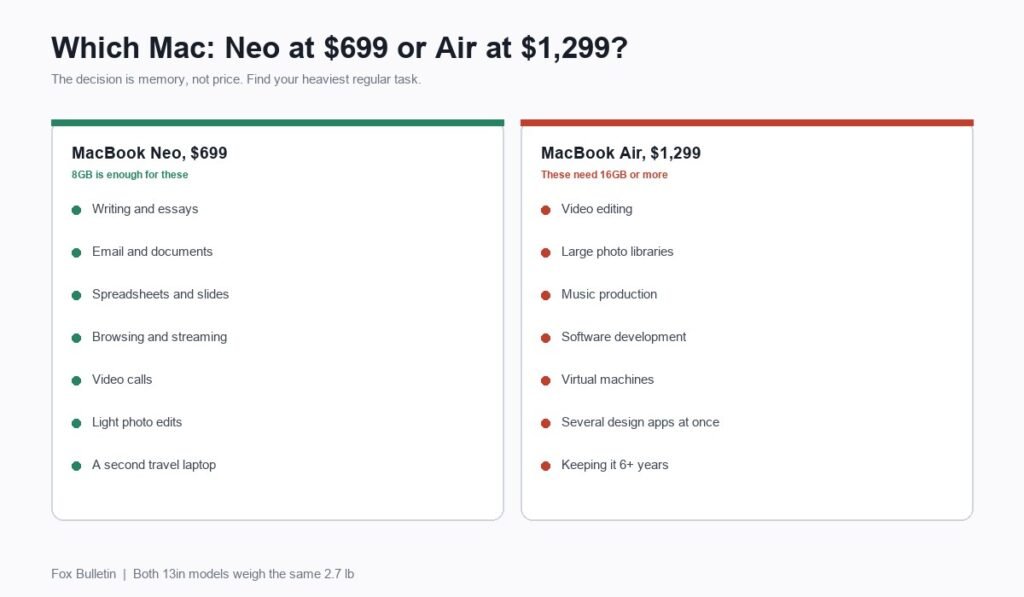
- Comfortable on 8GB: browsing with a sensible number of tabs, email, documents, spreadsheets, presentations, video calls, streaming, light photo edits, note-taking.
- Uncomfortable on 8GB: video editing, large photo libraries, music production with many tracks, software development, virtual machines, design work in several heavy applications at once, or thirty browser tabs alongside any of the above.
If everything you do is in the first list, the $600 buys you very little. If anything you do regularly is in the second, no amount of patience makes the Neo the right machine.
The A18 Pro Against the M5
The A18 Pro is a chip from Apple’s iPhone line. The M5 is built for Macs. Apple’s own comparison module sets them against each other directly, listing MacBook Neo with the A18 Pro and MacBook Air with the M5.
The gap is real but narrower than the branding implies for everyday work. An A18 Pro handles a browser, an office suite and a video call without complaint, and it runs Apple Intelligence on device, which is how Apple can sell a $699 laptop as an AI machine at all. Where the M5 pulls clearly ahead is sustained multi-core work: exporting video, compiling code, batch-processing images, anything that loads every core for minutes at a time.
For most buyers the chip is not the deciding factor. The memory attached to it is.
Ports: Two Unequal USB-C Against Thunderbolt and MagSafe
This is the second real difference and the one people underestimate.
MacBook Neo has three ports: one USB 3 USB-C, one USB 2 USB-C, and a headphone jack. The two USB-C ports are not equivalent, one being materially slower, and because there is no MagSafe, charging occupies one of them. Plug in power and you have a single port left, of whichever speed remains.
MacBook Air has four: two Thunderbolt 4 ports, a dedicated MagSafe 3 charging connector and a headphone jack. Charging uses none of the data ports. Thunderbolt 4 also supports fast external storage and external displays in a way USB 2 simply does not.
If you connect an external monitor, a fast SSD or a dock, this difference will shape your day more often than the processor will.
Which One by Workload
- Student writing essays and making presentations: MacBook Neo, and at $599 with education pricing it is not close.
- Office work in documents, email and calls: MacBook Neo, unless you live on video calls, where the Air’s 12MP Center Stage camera is a genuine daily upgrade over 1080p.
- Photo editing beyond occasional crops: MacBook Air. Photo libraries are a memory problem.
- Video editing at any level: MacBook Air, and consider 24GB rather than 16GB.
- Software development: MacBook Air. Containers, simulators and virtual machines all eat memory.
- Design work: MacBook Air, because design applications are habitually run several at a time. Our comparison of graphic design programs covers what those actually demand.
- A second, travelling laptop alongside a main machine: MacBook Neo.
- A laptop you want to keep for six or seven years: MacBook Air, because software grows into available memory and 8GB will age faster than 16GB.
What About the 15-inch Air?
If you have decided against the Neo, the next question is which Air. The 15-inch costs $200 more than the 13-inch and offers a 15.3-inch display at 2880 by 1864 against 13.6 inches at 2560 by 1664. The chip, memory options, storage options, ports, camera and 18-hour battery rating are the same.
The trade is weight: 3.3 pounds against 2.7. That is a noticeable difference in a bag carried daily, and it is the only meaningful cost of the larger screen. Choose on whether you work more at a desk or on the move.
The Case for Buying the Cheaper Machine
There is a genuine argument for the Neo that goes beyond budget. Spending $699 rather than $1,299 leaves $600, and $600 buys an external monitor and a keyboard, or a large external SSD and a dock, or simply stays in your account.
A Neo driving an external display at a desk, used for ordinary work, is a better daily setup than an Air used bare, for the same money. That calculation only holds if your workload fits in 8GB, which brings every part of this comparison back to the same question.
The Case for Spending the Extra $600
The counter-argument is longevity. A machine bought today will be asked to run software written in 2030, and software has never used less memory over time. 16GB has more room to absorb that than 8GB, and neither can be upgraded after purchase because the memory is part of the chip package.
There is also resale. Macs hold value unusually well, and the spread between an 8GB and a 16GB machine at resale tends to widen rather than narrow, which recovers part of the difference at the end. If you replace laptops every three years the Neo is fine; if you keep them until they stop, the Air is the cheaper machine over its life.
Before deciding, it is worth understanding exactly what unified memory does and why it is not interchangeable with storage, which our explainer on RAM versus storage covers.
Frequently Asked Questions
Is the MacBook Neo good enough compared with the MacBook Air?
For browsing, email, documents, presentations, video calls and streaming, yes, and the two 13-inch machines even weigh the same 2.7 pounds. The Neo falls behind on memory, with 8GB fixed against a minimum of 16GB, on ports, and on the camera. Those limits matter for heavy work and barely register for everyday tasks.
What is the real difference between MacBook Neo and MacBook Air?
Four things: the chip, with an A18 Pro against an M5; memory, 8GB fixed against 16GB to 32GB; ports, two unequal USB-C with no MagSafe against two Thunderbolt 4 plus MagSafe 3; and the camera, 1080p against 12MP Center Stage. Display size, storage ceiling and battery differ more modestly.
Is 8GB of memory enough on a Mac in 2026?
It depends on the work, not the year. macOS handles 8GB efficiently for light multitasking, and it becomes a bottleneck with video editing, large photo libraries, virtual machines or many heavy applications at once. Since the memory cannot be upgraded later, decide based on the heaviest thing you do regularly rather than the average.
Which MacBook is best for students?
MacBook Neo, at $599 with education pricing. Coursework, writing, research, presentations and video calls all sit comfortably within 8GB, and it is a 2.7-pound aluminium Mac with 16-hour battery life. Students on media or computing courses that require video editing or development tools should look at the Air instead.
Does the MacBook Air weigh more than the MacBook Neo?
No. Both the MacBook Neo and the 13-inch MacBook Air weigh 2.7 pounds. Only the 15-inch Air is heavier, at 3.3 pounds. Weight is not a reason to choose between the Neo and the 13-inch Air.
Related Articles

Get the Fox Bulletin briefing
The stories that matter, in your inbox. No spam, unsubscribe anytime.
Newsletter signup will be available soon.
Related stories
Airbus A380: Size, Range and Who Still Flies It
The largest passenger aircraft ever flown measures 72.72 m long and 79.75 m across the wings. Its specifications, the two decks, why production ended at 251 aircraft, and which airlines still fly it.
Apple Creator Studio: Price and the New AI Tools
Generate Fill in Pixelmator Pro, an AI assistant in Logic Pro and MotionVFX in Final Cut. A free update for subscribers.

Apple Home Collection: Every Accessory and Price
Cameras, a smart lock and two thermostats, built by LG and Schneider Electric and sold by Apple.