

Your Fortnite stats live in two places: the Career tab inside the game, and third-party stat sites such as fortnite.gg. The Career tab is the quickest route and needs no setup. A stat site adds figures the game leaves out, like K/D and average match time, but it can only read players who have switched on a setting called Public Game Stats.
This guide takes both routes in order, then covers the differences between PlayStation, Xbox, Switch, PC and mobile, how ranked numbers fit in, and what to do when your stats show zero or the screens stop matching each other.
Check Your Fortnite Stats in the Career Tab
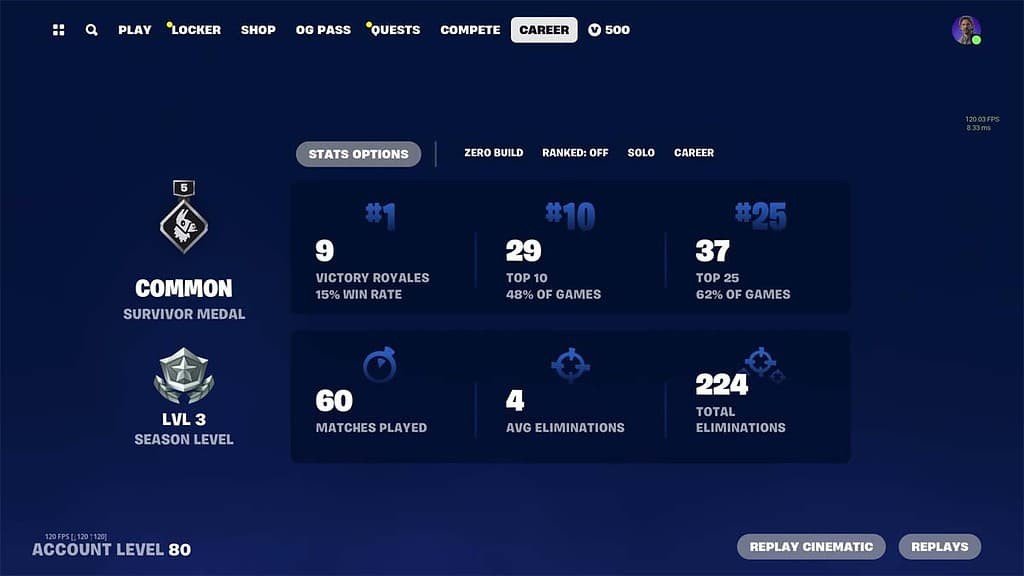
Nothing has to be switched on for this route. In the layout seen in April 2026 the lobby navigation reads Play, Locker, Shop, OG Pass, Quests, Compete and Career, and the Career tab is the one you want. Menus move between updates, so the labels below are a snapshot rather than a promise.
- Open the Fortnite lobby and select Career in the top navigation.
- Select Stats Options. On PlayStation this prompt sits on the Triangle button.
- Choose Battle Royale or Zero Build.
- Choose Ranked or Unranked. On current builds, Ranked starts set to Off.
- Choose a party size such as Solo, then a time frame. Career is the lifetime total.
- Press Apply and the tiles redraw for that selection.
Each filter combination is its own set of numbers. A Solo Zero Build view and a Duos Battle Royale view will never match, which is the first thing to rule out when a total looks wrong. The tiles you will see are:
- Victory Royales. Your wins, printed with a win rate beside the number.
- Top 10 and Top 25. How many matches you finished in each band, each with a percentage of your games.
- Matches Played. The total for whatever mode, party size and time frame you filtered to.
- Avg Eliminations and Total Eliminations. Knockouts per match and in all.
- Survivor Medal, Season Level and Account Level. Progress markers shown down the left-hand side of the screen.
Which Fortnite Stats Each Place Shows and Which It Leaves Out
No single page carries everything. The table sorts the four places most players use by whether they need Public Game Stats, what they show, and where each one runs out.
| Where to look | Needs public stats? | Shows | Limits |
|---|---|---|---|
| Career tab in the game | No, it is your own view | Victory Royales with win rate, Top 10 and Top 25, matches played, average and total eliminations, season and account level | No K/D tile and no average match time |
| fortnite.gg stats search | Yes | A season card with wins, win rate, matches, K/D, kills per match, kills, time played, average match time and level | Anything you have chosen to keep private; the site is not run by Epic |
| fortnite.gg Wrapped | Yes | Levels gained, hours played, matches, wins, kills and most played seasons by share of playtime | A live stat page; it is a recap built by the site, not by Epic |
| Fortnite Scout | Yes | A graph of K/D and win rate over several months | Official Epic figures; it is a third-party site too |
The pattern is simple. The Career tab is official and always available to you, while every stat site is a separate service that reads whatever you have chosen to make public. If you want a K/D, you need a stat site or a bit of arithmetic, which is covered further down.
Turn On Public Game Stats So Stat Sites Can See You
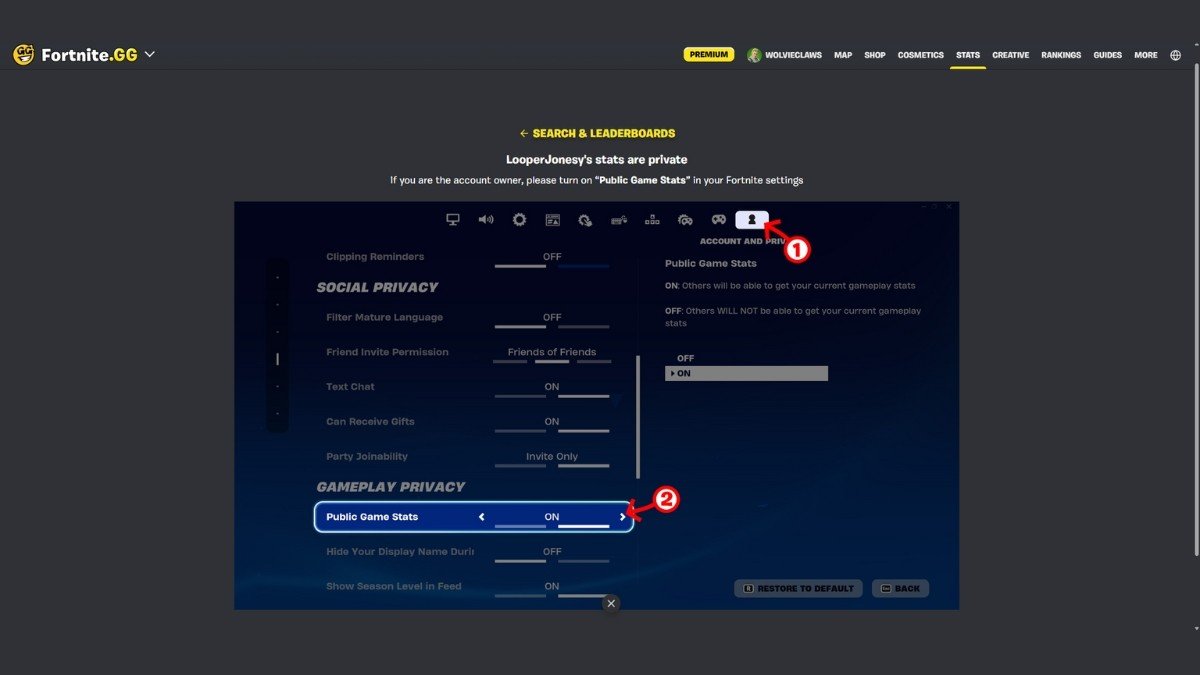
Public Game Stats is an on or off switch in your account settings. In the game its description says that switching it on lets others get your current gameplay stats, and switching it off stops them. Older posts call the same control Show on Career Leaderboard, which appears to be its earlier name.
- Open the game menu and choose Settings.
- Select the Account and Privacy tab, marked with a person icon.
- Scroll to the Gameplay Privacy section.
- Set Public Game Stats to On.
The same section holds a couple of neighbouring switches, including one that hides your display name during matches and one that shows your season level in the feed. Leave them alone unless you want them changed.
After you flip the switch, wait a while and search again rather than refreshing every ten seconds. If a site keeps showing numbers after you turn the setting off, ask that site’s own support, because Epic does not run it. Stats hang off your Epic account, so it is also worth adding two-factor authentication before you put your name on public pages.
Look Up Your Fortnite Stats on fortnite.gg

fortnite.gg is the most widely used stat site, and its stats page is built around a single search box. Type an Epic name, or use the Xbox or PlayStation icons beside the box if a console name is all you remember. There is no sign-in and no account to create.
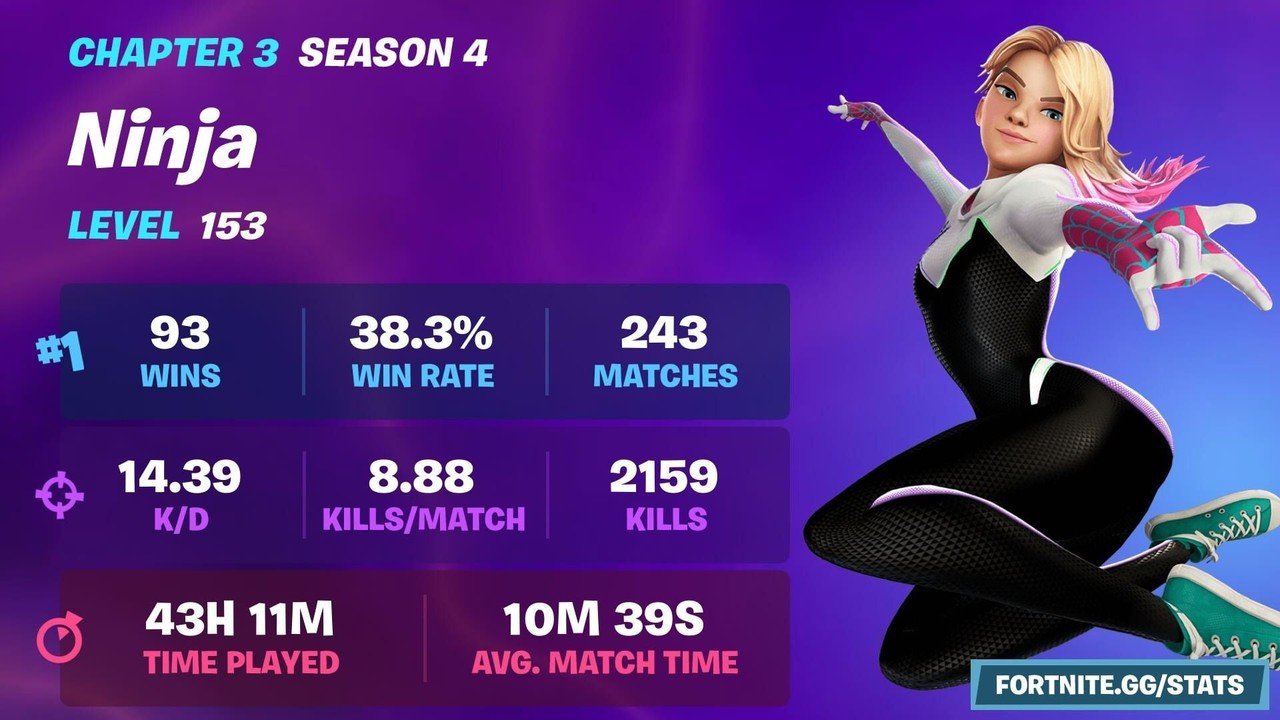
Your result is a season card, and in screenshots from December 2025 the mode tabs along the top included All, BR, OG, Reload, Ranked and Ranked Reload. The card lists wins, win rate, matches, K/D, kills per match, total kills, time played, average match time and level. Level and wins leaderboards sit on the same page, and a caption under them says they update each time you view your stats.
When a profile is private the site does not guess. It shows a prompt telling the owner to switch on Public Game Stats, which is the same setting from the previous section. The site also has Shop and Map sections in its navigation, but those are separate from player stats.
Other Stat Sites Worth Trying
A second site is useful when you want a view the first one does not offer. All of them are independent of Epic and read the same public data you have chosen to expose.
- Fortnite Scout. Draws K/D and win rate as a graph over several months, which makes a slow improvement or a bad patch easy to spot.
- fortnite.gg Wrapped. A year-end recap run by fortnite.gg rather than Epic. It needs no sign-in and shows levels gained, hours, matches, wins, kills and your most played seasons by share of playtime. The edition we looked at was the 2025 one, so check the site for whether a newer one is live.
- Save and share. The Wrapped page has Save Image and Share buttons, so a recap can be posted without screenshots.
Treat the numbers on any of these as a good estimate rather than a statement from Epic. If a site and your Career tab disagree, the filters section near the end of this guide explains the usual cause.
Check Fortnite Stats on PlayStation, Xbox, Switch, PC and Mobile
Stats belong to your Epic account, not to the console or phone you played on. The Career tab is the same on every platform, and only the way you press the buttons changes.
- PlayStation. Stats Options is on the Triangle button.
- Xbox and Switch. The Stats Options prompt shows its own button on screen, so follow the icon rather than a guide.
- PC. Click Career, then click Stats Options with the mouse.
- Mobile. Tap Career and then Stats Options. Stat sites work in a phone browser, and fortnite.gg’s search takes an Xbox or PlayStation name if you do not know your Epic one.
The one trap is playing on two Epic accounts. Each has its own totals, so a console login that points at a second account will show a smaller number than you expect. Modes built around survival or building, such as the ones in our guide to LEGO Fortnite modes, are not about eliminations, so the Battle Royale tiles are not where to look for them.
Work Out Your K/D When the Career Tab Skips It
The Career tab prints no K/D, but it does print the three numbers you need for a close estimate. In a solo match you die once in every match you do not win, so deaths are roughly matches minus wins. K/D is then eliminations divided by that figure.
- Take your matches played and subtract your Victory Royales.
- Take your total eliminations.
- Divide eliminations by the result of step one.
Here is a made-up account. It has 100 matches, 12 wins and 176 eliminations. Matches minus wins is 88, and 176 divided by 88 gives a K/D of 2.00. Its win rate is 12 divided by 100, or 12 per cent.
Treat the result as approximate. Squad modes, modes with respawns and the odd death to the storm bend the sum, so the figure on a stat site is the exact one. The season card in the picture above is a 2022 example, but it shows the layout well: K/D, kills per match and average match time sit next to each other.
Ranked Stats: What the Ranked Filter Changes
Ranked numbers live in their own filter. In the Career tab you flip the Ranked option from Off to On and the tiles redraw for ranked matches only, and fortnite.gg keeps separate Ranked tabs for the same reason. Your casual totals and your ranked totals never blend.
A new account cannot use ranked until it finishes the quest to outlast 500 players, and after that the toggle sits above the Play button. Battle Royale and Reload run separate ladders, so a climb in one does not show up in the other. The full ladder, the tiers and what moves your progress are laid out in our guide to Fortnite ranks in order.
One caution for anyone reading a rank off a stat site: the site reports a snapshot taken when you searched, and the in-game screen is always the final word on where you sit.
Why Your Fortnite Stats Show Zero or Do Not Match
Almost every complaint about missing or mismatched stats comes down to one of five causes. Check them in this order.
- Public Game Stats is off. A stat site will show a private prompt or nothing at all until the setting is on.
- You are on the wrong Epic account. The account you play on and the account you searched are two separate sets of numbers.
- The match is too fresh. Give a new match about 15 minutes before deciding something is broken.
- The filters differ. The Career tab shows one mode, party size and time frame at a time, while a stat site may be set to All.
- The mode scope differs. Sites split modes into tabs, and Ranked is its own filter in both places.
If all five check out, stats can still lag or glitch for a while after an update. Search again later before assuming anything is lost.
Frequently Asked Questions
Why does a stat site say my Fortnite stats are private?
Public Game Stats is switched off on your account. Go to Settings, then Account and Privacy, scroll to Gameplay Privacy and turn it on. Wait a while and search again.
Where do I see my stats inside Fortnite?
Open the Career tab in the lobby, then Stats Options. Pick the mode, ranked or unranked, party size and time frame, and press Apply to see the tiles for that selection.
Do I need to link my console account to check stats?
No. Stats sit on your Epic account, and fortnite.gg accepts an Epic name or an Xbox or PlayStation name with no sign-in. You only need to be on the account you played on.
Can I look at another player’s Fortnite stats?
On a stat site, yes, as long as that player has Public Game Stats switched on. If it is off, the site shows a private notice instead of numbers.
Related Articles

Get the Fox Bulletin briefing
The stories that matter, in your inbox. No spam, unsubscribe anytime.
Newsletter signup will be available soon.
Related stories
Rarest Fortnite Emotes Ranked by Last Time in the Shop
The rarest Fortnite emotes ranked by their last Item Shop date, with price, release date and years away, plus the pass-only emotes that were never for sale.

Fortnite Save the World Free: What You Get and Earn
Fortnite Save the World has been free since 16 April 2026. Here is what free players earn, what Founders still get, and how the currency rules changed.
Fortnite XP Maps: 13 Island Codes Verified Live
Thirteen Fortnite XP map island codes checked against live island pages, ordered from hands-off to hands-on, plus how calibration and diminishing returns change your payout.