

Here is how to delete Facebook account data for good in 2026: open the Facebook app, tap Menu, go to Settings and privacy, then Settings, open Accounts Center, and tap Personal details, Account ownership and control, then Deactivation or deletion. Choose Delete account, confirm with your password, and Facebook starts a 30-day countdown before the profile is erased.
The taps take a few minutes on an iPhone or an Android phone. The slower part is what comes before them: saving a copy of your photos, moving any Page you run to someone else, and unhooking apps you sign in to with Facebook. This guide covers each step in order, with screenshots of the real app screens.
How to Delete Facebook Account: The Short Version
In the Facebook app, tap Menu (bottom right on iPhone, top right on Android), then Settings and privacy, Settings, Accounts Center, Personal details, Account ownership and control, and Deactivation or deletion. Pick your profile, select Delete account, tap Continue and enter your password. Log back in within 30 days and tap Cancel deletion if you change your mind.
What You Need Before You Start
Set aside about 10 minutes for the deletion itself, plus time for the data export to finish. Have these ready:
- Your Facebook password. The app asks you to re-enter it before the deletion goes through.
- Access to your login email or phone number, in case Facebook needs to verify you or you decide to come back during the 30 days.
- A list of apps you log in to with Facebook. Meta names Spotify and Pinterest as examples of apps that stop working through Facebook Login once the account is gone.
- Free storage space on your phone or computer if you plan to export photos and videos.
Your settings may say Meta Account instead of Accounts Center. Meta announced the change on April 23, 2026 and is rolling it out gradually over a year, so both labels are live right now. The steps below cover both.
Step 1: Download Your Facebook Data First
Once the deletion completes, nothing you added can be retrieved, and a profile scheduled for deletion cannot be exported at all until you cancel. Meta moved this tool into Accounts Center in October 2023, when Download Your Information became an Accounts Center setting. From the app:
- Tap Menu, then Settings and privacy, then Settings.
- Tap Accounts Center, then Your information and permissions.
- Tap Export your information, then Create export.
- Select your Facebook profile and tap Next.
- Choose Export to device.
- Pick the information, date range, format and media quality, then tap Start export.
HTML gives you a ZIP file with an index page you open in a browser, while JSON suits moving the data to another service. Higher media quality makes the file larger. You’ll know it worked when Facebook sends an email and an in-app notification; the file then sits in Available downloads for four days, so grab it before you delete.
Step 2: Unhook Apps, Pages and Your Meta Quest
Deleting the account also cuts every connection that depends on it. Sort these out while you can still log in:
Apps and websites you signed in to with Facebook
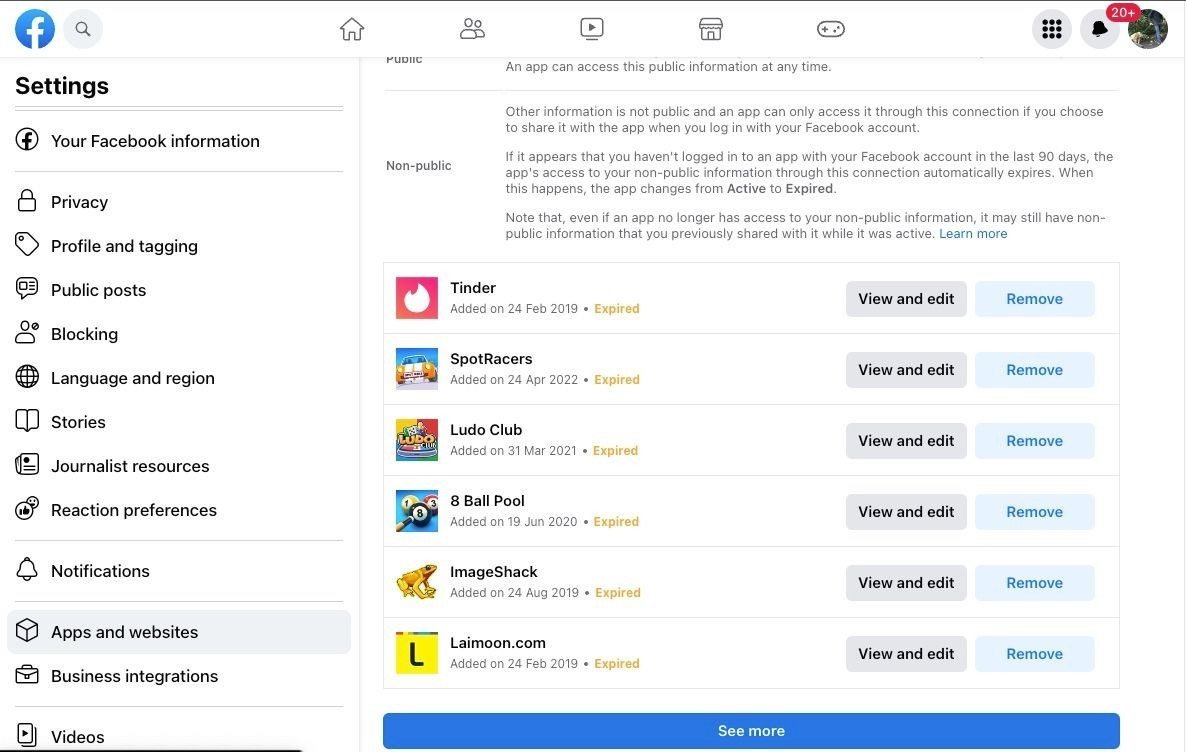
On a computer, go to Settings and privacy, then Settings, and open Apps and websites in the left menu. Next to each app, click Remove and confirm. Tick the box that lets Facebook tell the app your login was removed, so it can offer another way in, then set an email and password on that service. A password manager makes the switch from one-tap logins painless. Apps keep what they already stored, so ask the developer if you want that erased too.
Pages you manage
Pages that only you control are deleted along with your profile. To keep one alive, give another person full control of the Page first; you can then delete your account without taking the Page down with it.
Meta Quest headsets
If you log in to a Meta Quest headset with Facebook, deleting the profile also deletes your Quest information, including app purchases and achievements. You can no longer return apps, and any store credit is lost.
Step 3: Delete Your Facebook Account in the App
The menus are the same on iPhone and Android apart from where the Menu button sits. Follow these taps in order:
- Open the Facebook app on your main profile.
- Tap Menu: the three-line icon in the bottom right on iPhone, or top right on Android.
- Scroll down, tap Settings and privacy, then tap Settings.
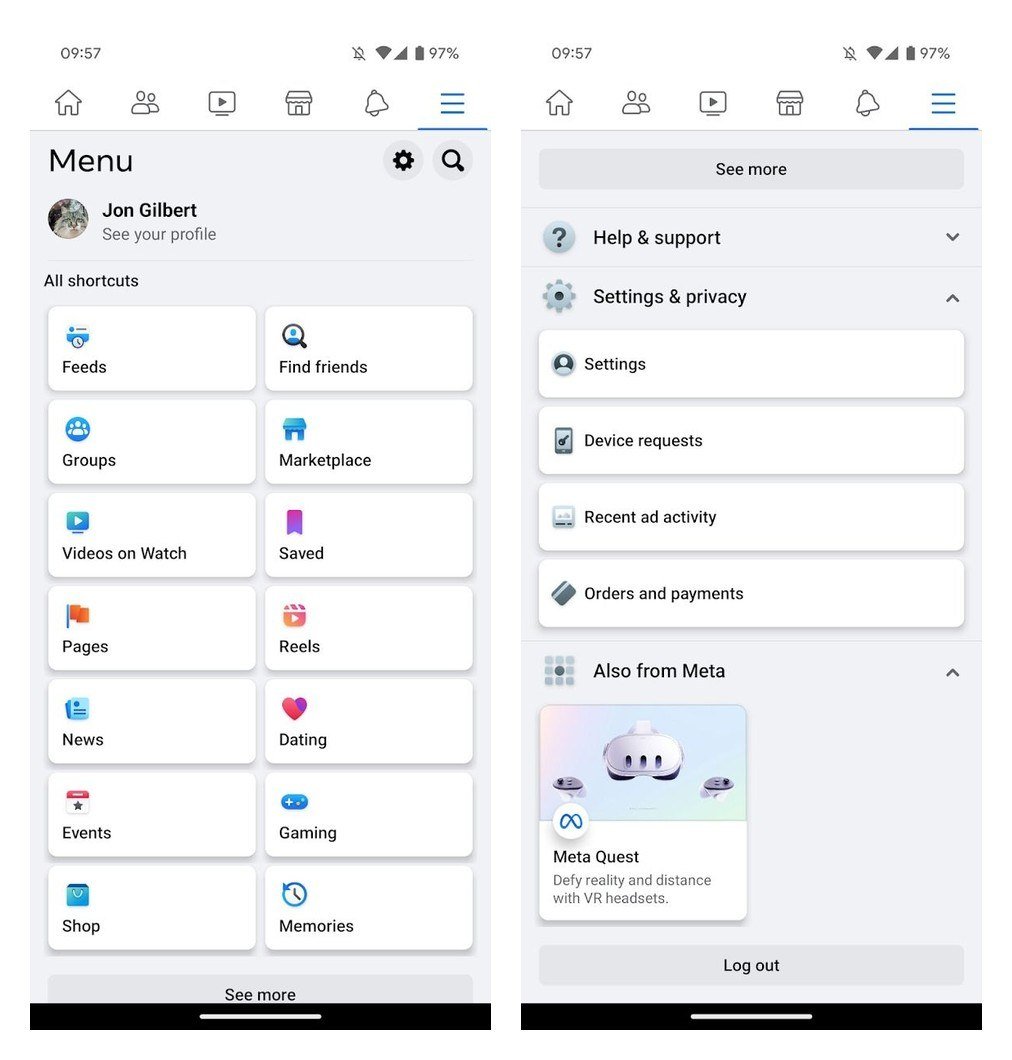
- Tap Accounts Center (or Meta Account) near the top of the Settings screen.
- Tap Personal details.
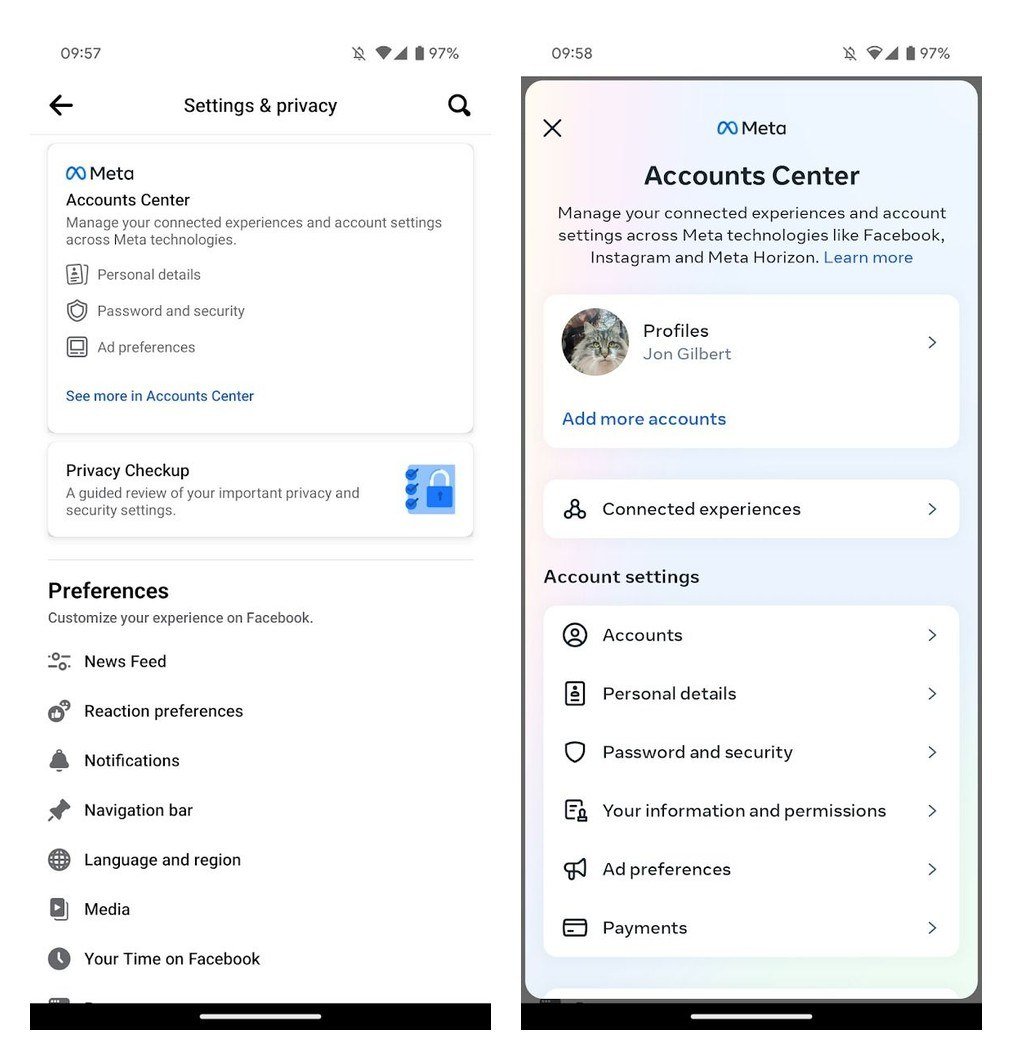
- Tap Account ownership and control.
- Tap Deactivation or deletion.
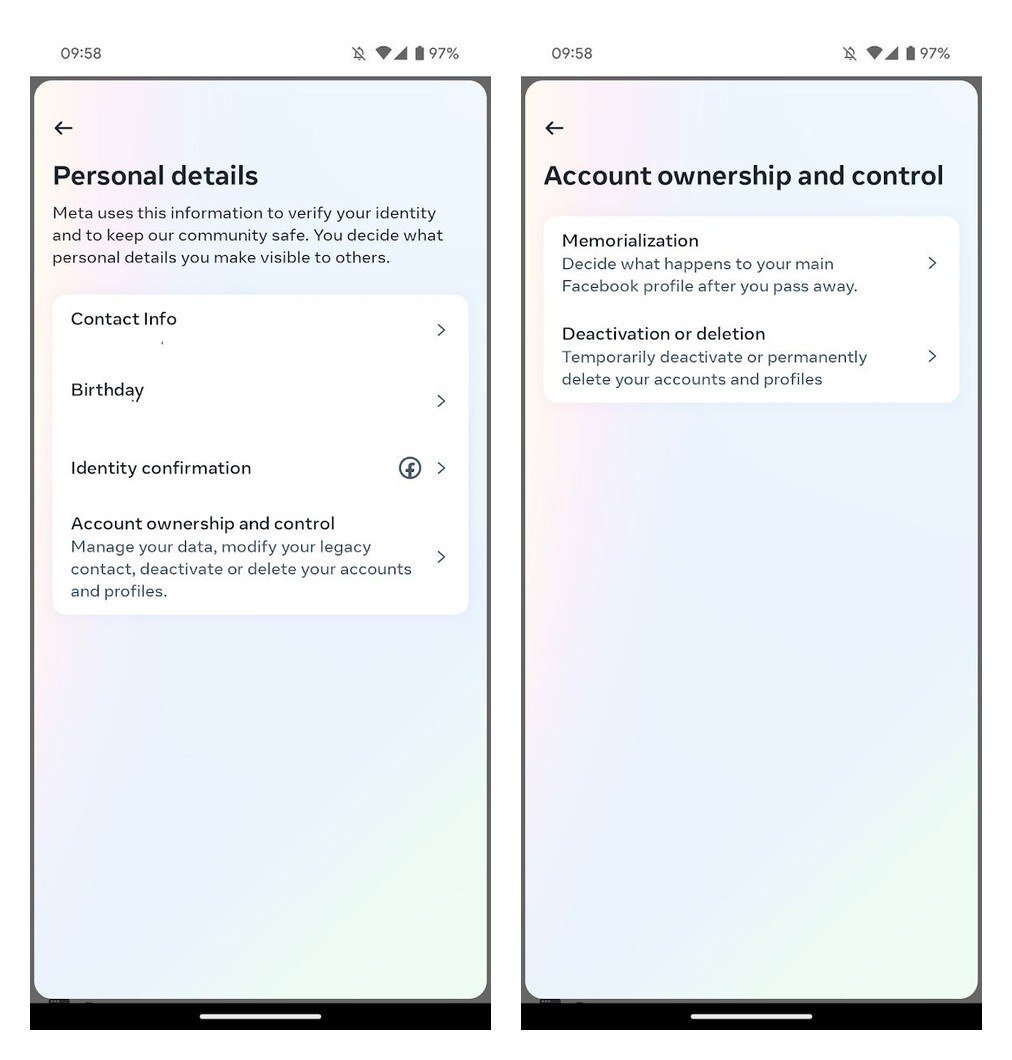
- Choose the profile you want to delete.
- Select Delete account and tap Continue.
- Follow the prompts, enter your password and confirm.
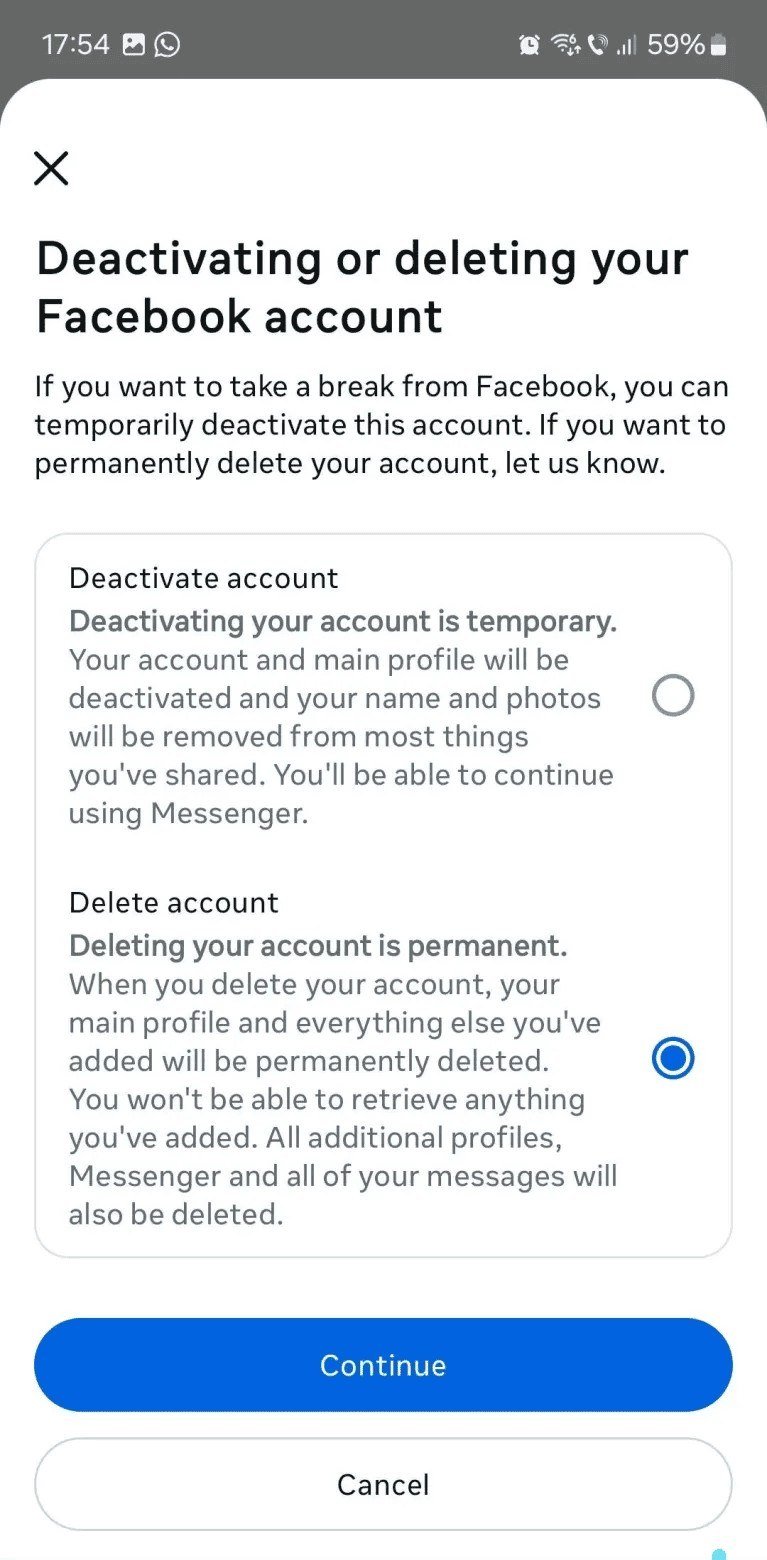
If your screen shows Manage account at the bottom of Meta Account instead, the route is shorter: Meta Account, Manage account, Manage, then Deactivation or deletion. The final screens are the same. Note the warning on the Delete account option: additional profiles, Messenger and all of your messages go with it.
You’ll know it worked when Facebook emails you that the account is scheduled for permanent deletion, with the date after which it can no longer be recovered.
Deactivate Facebook Account Instead: What Changes
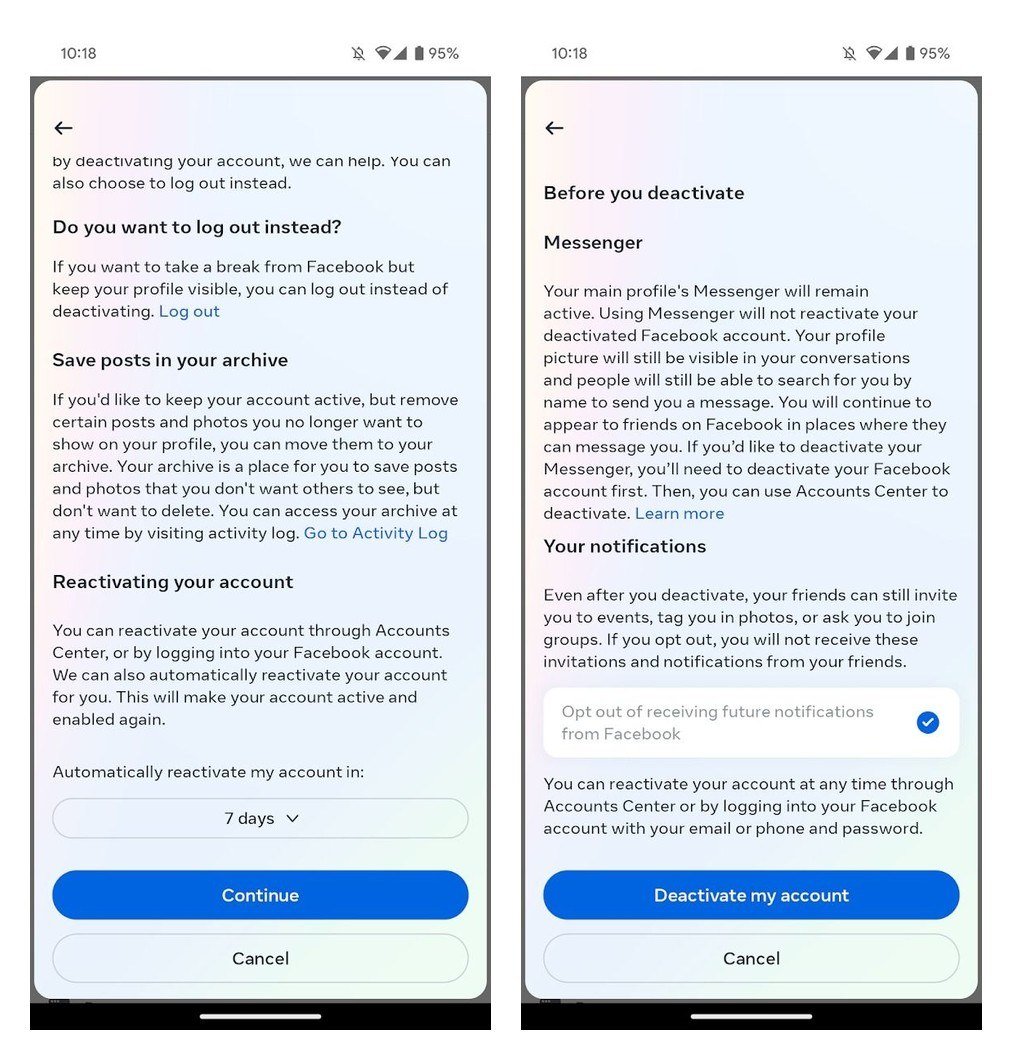
Deactivation lives on the same Deactivation or deletion screen and is the option to pick if you want a break rather than an exit. Nothing is deleted, and logging back in reactivates the account whenever you like.
| What happens | Deactivate | Delete |
|---|---|---|
| Profile visible to others | No | No, then erased |
| Photos, posts, videos | Kept | Permanently deleted |
| Messenger | Keeps working if you stay logged in | No longer usable |
| Pages only you control | Deactivated | Deleted |
| Meta Quest access through Facebook | Unavailable | Quest data and purchases deleted |
| How to undo | Log in any time | Log in within 30 days, tap Cancel deletion |
A deactivated account still leaves traces. Messages you sent stay visible, friends can still see your name in their friends list, and group admins may still see your posts and comments. In Messenger, people can find you and send messages, and your profile picture still shows in chats. To switch Messenger off as well, deactivate Facebook first, then open the Messenger app on your phone and run the same Deactivation or deletion steps there; Meta only allows that on a mobile device.
The 30-Day Window: How to Cancel a Deletion
Deletion is not instant. For 30 days after you start it, the account sits in a holding state, and Meta notes the number of days can vary by region. To undo it:
- Log in to Facebook with your usual email or phone and password within 30 days.
- Tap Cancel deletion when Facebook offers it.
After day 30, the account and its information are permanently deleted. Meta says it can take up to 90 days from the start of the process to remove everything you posted, and during that time none of it is visible to other people. Copies can sit in disaster-recovery backups after the 90 days, and Meta may keep some information for legal issues, terms violations or harm prevention.
What Happens to Messenger, Instagram and Your Messages
- Messenger: you can no longer use it once the Facebook account is deleted.
- Messages you sent: copies live in your friends’ inboxes, so they may still read them.
- Instagram: other profiles in your Meta Account are not affected. Your Instagram stays up until you delete it separately through its own Accounts Center, on the same 30-day schedule.
- Additional Facebook profiles: deleting the main account deletes every profile under it. To remove just one extra profile, delete it on its own; its data goes after 30 days.
If you are tidying up several social accounts at once, our walkthrough on how to delete a Snapchat account follows the same export-first approach, and Meta’s own app changes are tracked in our Instagram updates roundup.
Deleting a Deceased Person’s Facebook Account
A family member or executor can ask Meta to remove the account of someone who has died. The fastest route is a scan or photo of the death certificate. Without one, Meta asks for one proof of authority (a power of attorney, a birth certificate for a minor, a last will and testament, or an estate letter) plus one proof of death, such as an obituary or memorial card. Meta never hands out login details for someone else’s account.
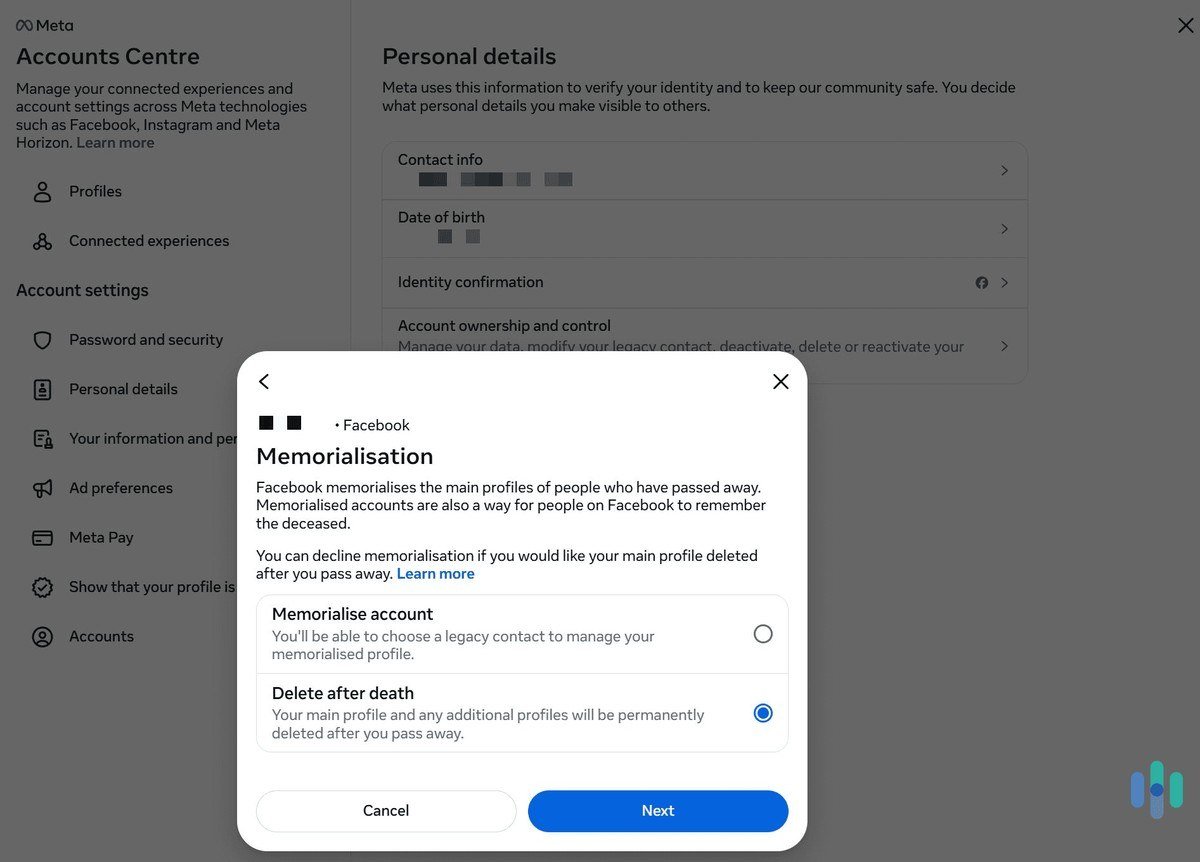
The alternative is memorialization: the profile stays up with Remembering next to the name and nobody can log in. You can plan your own digital legacy now under Account ownership and control, then Memorialization. Pick a legacy contact aged 18 or older to manage the memorialized profile, or choose Delete after death, which erases your main and additional profiles as soon as Meta learns you have passed away.
Common Mistakes When Deleting Facebook
- Uninstalling the app and calling it done. Removing the app from your phone leaves the account live; only Deactivation or deletion removes it.
- Logging back in during the waiting period. Meta says a deletion request is cancelled if you log back in to your profile, so sign out of Facebook on every phone, tablet and browser once you confirm.
- Forgetting a Page you run alone. It is deleted with you unless someone else has full control.
- Deleting before the export finishes. A profile scheduled for deletion cannot be exported, so you would have to cancel and start again.
Frequently Asked Questions
How long does it take to delete a Facebook account?
You have 30 days to cancel after starting the deletion. After that the account is permanently deleted, and Meta says removing everything you posted can take up to 90 days from the start.
Can I get my Facebook account back after deleting it?
Yes, within the 30-day window. Log in and tap Cancel deletion. Once the window closes, the account and everything in it cannot be recovered.
Does deleting Facebook delete my Instagram account?
No. Meta says other profiles in your Meta Account are not affected. Instagram has its own Delete account option under Accounts Center if you want it gone too.
Will my Messenger chats disappear for everyone?
No. You lose access to Messenger, but copies of messages you sent stay in your friends’ inboxes, so they may still see them.
Related Articles

Get the Fox Bulletin briefing
The stories that matter, in your inbox. No spam, unsubscribe anytime.
Newsletter signup will be available soon.
Related stories

Claude Duet: Anthropic’s New Agent That Works While You Rest
Anthropic opened a research preview of Claude Duet on October 21, 2026. Here is what the agent does in your connected apps, where it stops to ask you, and how to get on the waitlist.

Best Tech Gifts for Men 2026: 10 Gadgets From Earbuds to Dash Cams
The best tech gift for most men is the Sony WF-1000XM6, a pair of noise cancelling earbuds he will use on every commute, call and flight. If he already has earbuds, the…

Best Gifts for Gamers 2026: 10 Gaming Gifts From Headsets to Chairs
The best gift for a gamer is a wireless headset that works on the console they already own, and the Turtle Beach Stealth 700 (Gen 3) is the safest choice when you…