

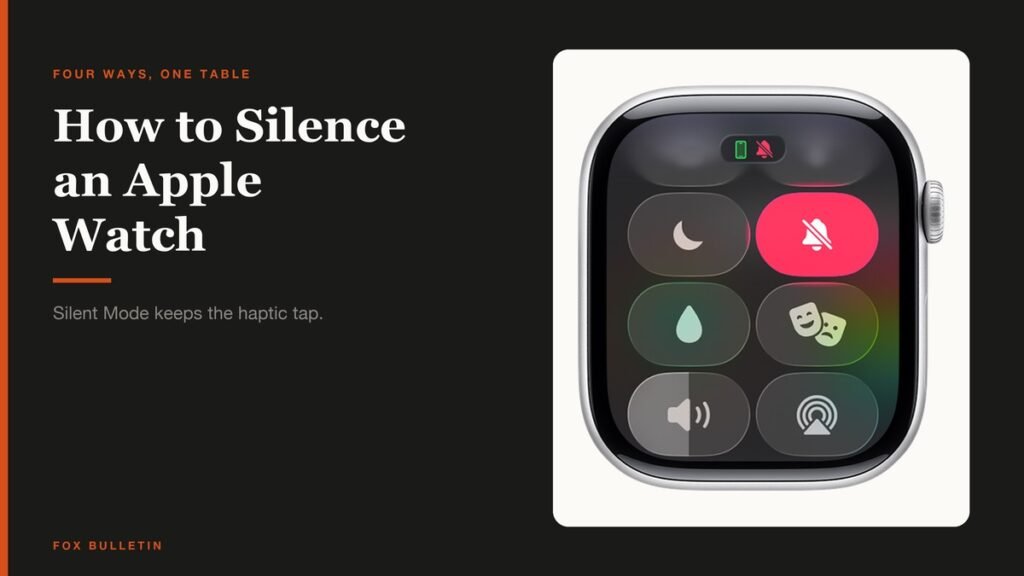
There is no single mute switch, which is why how to silence Apple Watch has four answers rather than one. Silent Mode kills the sound. Theater Mode kills the sound and the screen. Do Not Disturb kills the taps as well. Focus does all of that on a schedule with exceptions you choose.
Picking the wrong one is the usual complaint behind a watch that still buzzed through a funeral. Silent Mode, the option most people reach for first, deliberately leaves the haptic tap switched on.
What You Need and How Long It Takes
Everything here is built into watchOS and takes seconds. Most of it is one press and one tap, from any screen.
- An Apple Watch on watchOS 27, for the steps as written
- The paired iPhone, only if you prefer setting it from the Apple Watch app
- About five seconds per mode, once you know which one you want
- Nothing to install and nothing to pay for
The short version: press the side button to open Control Center, then tap the Silent Mode button to mute sounds. Tap Theater Mode as well to keep the screen dark. For no sound and no taps, tap the Do Not Disturb button and choose how long it should last.
How to Silence Apple Watch: the Four Modes Compared
Apple publishes the difference between these modes rather than leaving you to guess, in its guide to silencing notifications for extended periods. This is the table worth reading before you choose.
| Silent Mode | Theater Mode | Do Not Disturb | Focus | |
|---|---|---|---|---|
| Sounds | Off | Off | Off | Off, with exceptions you set |
| Haptics | On, if you allow | On, if you allow | Off | Off, with exceptions you set |
| Visual notifications | On | Off | Off | Off, with exceptions you set |
| Display on wrist raise | On | Off | On | On, except modes like Sleep |
| Best for | A quiet room where you still want to see and feel alerts | A cinema or any dark venue | Meetings and appointments | Sleep, work and other scheduled activities |
Read the Haptics row twice. Only Do Not Disturb and Focus stop the tap on your wrist. Silent Mode and Theater Mode both leave it on, which is exactly what you want in a quiet office and exactly what you do not want in a cinema seat next to a light sleeper.
Turning On Silent Mode
Silent Mode mutes alerts, notifications and sound effects, and nothing else. You keep seeing notifications arrive and you keep feeling them.
- Press the side button to open Control Center. You know you are there when the grid of round buttons appears.
- Tap the Silent Mode button, the bell with a line through it. You know it worked when the button fills with colour and the bell icon appears at the top of the screen.
- Or set it from the iPhone. Open the Apple Watch app, tap My Watch, tap Sounds & Haptics, then turn on Silent Mode.
One exception matters and it has caught people out: while the watch is charging, alarms and timers still sound even in Silent Mode. A watch muted on a bedside charger will still wake the room at 6am.
Theater Mode, and When the Screen Is the Problem
Theater Mode exists for the thing Silent Mode does not solve: a bright screen lighting up every time your arm moves. It stops the display waking on a wrist raise, and turns on Silent Mode at the same time.
Press the side button for Control Center and tap the Theater Mode button, the pair of masks. When it is on, the masks icon appears at the top of the screen. To wake the watch deliberately while it is on, tap the display, press the side button, or turn or press the Digital Crown.
Haptics stay on, so Theater Mode is dark and quiet but not still. If someone beside you can hear your wrist buzzing, you want Do Not Disturb instead.
Do Not Disturb and Focus, for Total Silence
These are the only two that stop the taps. Both live behind the same Control Center button, and both can be told when to end.
- Press the side button to open Control Center.
- Tap the Do Not Disturb button, the crescent moon.
- Choose Do Not Disturb or one of your Focus modes.
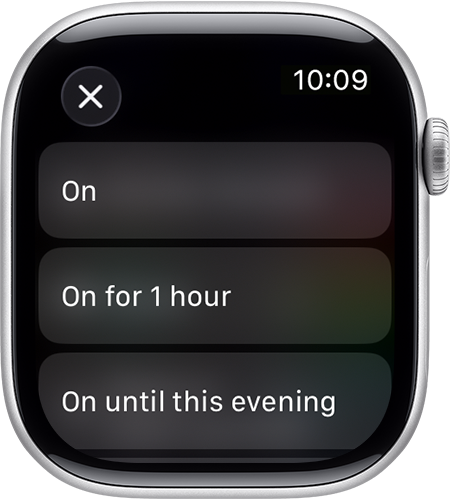
- Tap On, or pick an ending point such as On for 1 hour, On until this evening or On until I leave.
The timed options are the useful part. Apple also offers an until-the-event-ends choice when a calendar entry is running, and an indefinite setting for anyone who would rather decide manually. A Focus goes further still, because you can let named people or apps through while everything else stays quiet, which Apple covers in its guide to using Focus on Apple Watch.
Muting One Alert Without Changing Any Setting
For a single alert sounding at the wrong moment there is a gesture rather than a mode. Rest your palm flat on the display for at least three seconds, until you feel a tap. The alert stops immediately.
If nothing happens, the gesture is switched off. On the watch, open Settings, then tap Gestures and turn Cover to Mute on. Apple deliberately excludes one thing from this: wake-up alarms are never silenced by the cover gesture, so a sleeping arm falling across the watch cannot cancel the alarm.
Turning the Volume Down Instead of Off
Silence is not always the answer, and the watch has three separate dials worth knowing about before you mute it entirely.
- Alert volume: Settings, then Sounds & Haptics, where the level can be set louder or quieter rather than off
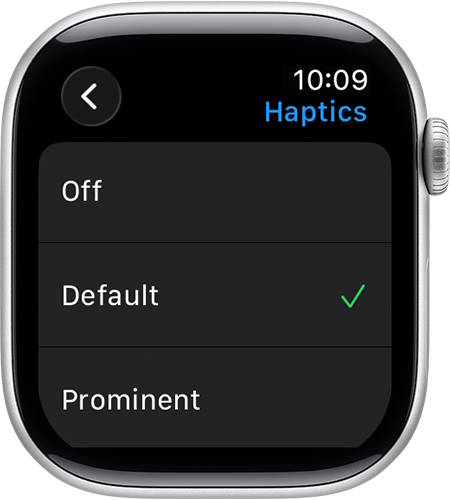
- Haptic strength: Settings, Sounds & Haptics, Haptics, then Off, Default or Prominent. Prominent adds an extra tap that pre-announces some alerts
- Crown Haptics: a separate switch under Sounds & Haptics for the ticks you feel when turning the Digital Crown
- Media volume: set from the volume button in Control Center, independently of alerts
Taptic Chimes are worth a mention here because they work the other way round, adding sound rather than removing it. Under Settings, Accessibility, then Chimes, the watch can be set to chime on the hour or every 30 or 15 minutes, with a choice of Birds or Bells. It is a way of tracking time without raising your wrist at all.
Haptics depend on contact. Apple notes that the back of the watch needs skin contact for the best result, so a loose strap feels like a weak tap. Our guide to changing an Apple Watch band covers getting that fit right, and the volume and haptics reference has the full settings list.
Choosing the Right Mode for the Room
The table above answers what each mode does. This is what each one is actually for.
- An open-plan office: Silent Mode. Sound off, screen and taps on, so you still catch a message without announcing it to the room
- A cinema, theatre or any dark venue: Theater Mode. The screen is the problem there, not the volume, and a lit wrist is visible three rows back
- A meeting or an interview: Do Not Disturb, set to end in an hour. This is the only setting that stops the wrist tap you cannot ignore mid-sentence
- Overnight: the Sleep Focus, which handles the screen as well and turns itself off at your wake time rather than waiting to be remembered
The common mistake is reaching for Silent Mode in the third case. A tap on the wrist is genuinely harder to ignore than a sound, because you feel it even when you have decided not to look, and it arrives whether or not the room is quiet.
A watch that interrupts constantly is usually carrying too many notifications rather than needing a mute. Pruning which apps can alert you at all does more than any mode here, and the same applies to the faces you keep, which our guide to changing an Apple Watch face covers.
Frequently Asked Questions
Does Silent Mode stop the Apple Watch vibrating?
No. Silent Mode mutes alerts, notifications and sound effects, and Apple states you still receive haptic notifications. If you want the taps to stop as well, use Do Not Disturb or a Focus, which are the only two modes that switch haptics off.
Will my alarm still go off on a silenced Apple Watch?
Yes, in one specific case. Apple notes that while the watch is charging, alarms and timers still sound even in Silent Mode. A watch sitting on a bedside charger overnight will therefore still sound its alarm, which is usually what you wanted but occasionally is not.
What is the difference between Theater Mode and Silent Mode?
Theater Mode does everything Silent Mode does and also stops the display turning on when you raise your wrist. That is the reason it exists: in a dark room the screen is the problem rather than the sound. Haptics stay on in both.
How do I mute a single alert without changing settings?
Rest your palm on the display for at least three seconds, until you feel a tap. The setting behind it is Cover to Mute, under Settings then Gestures on the watch. It works for everything except wake-up alarms, which Apple deliberately exempts.
Related Articles

Get the Fox Bulletin briefing
The stories that matter, in your inbox. No spam, unsubscribe anytime.
Newsletter signup will be available soon.
Related stories
How to Turn Off an Apple Watch and Restart It
How to turn off an Apple Watch in watchOS 27, restart it, and force restart a frozen one, plus the charging rule that hides the power slider.
How to Track Sleep on Apple Watch and Read It
How to track sleep on Apple Watch from setup to stages, how the 0 to 100 Sleep Score is calculated, and the two settings that decide whether you get data.
How to Change Apple Watch Face and Complications
How to change Apple Watch face on the watch and from the iPhone, pick complications, reorder your collection and remove the faces you never use.