

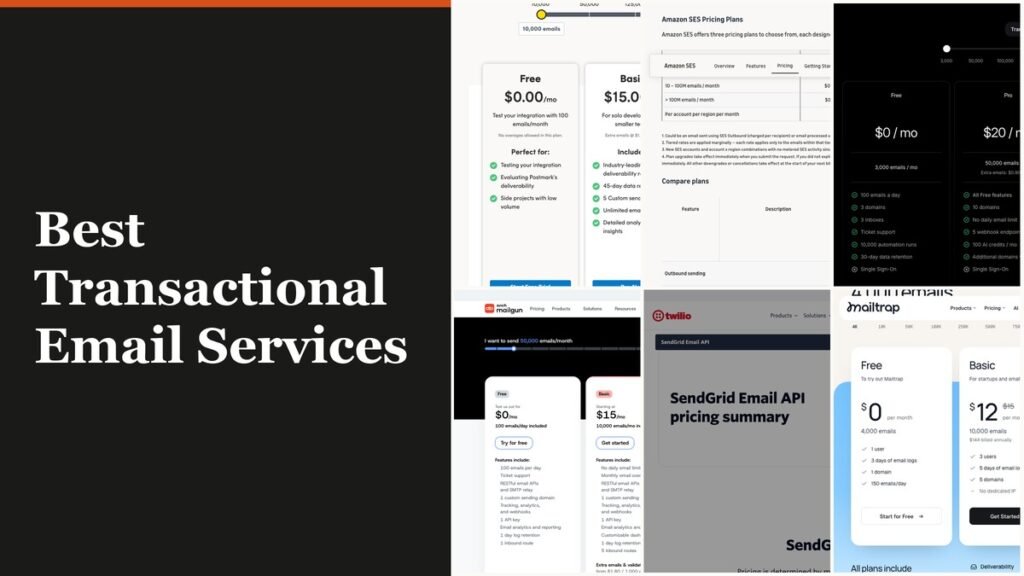
A transactional email service is the pipe that carries password resets, receipts and verification codes out of your application, and the best transactional email services separate themselves less on what they send than on what they charge the moment you outgrow the free tier. The spread is wide: 50,000 messages a month cost $5.00 on Amazon SES and $56 on Brevo.
Four numbers decide that bill: the free allowance, the cheapest paid plan, how many emails the plan includes and the price of the first 1,000 messages beyond it. They pull in different directions, so the provider with the biggest free tier is rarely the one with the cheapest overage.
What a Transactional Email Service Actually Does
A transactional email service accepts a message from your application over SMTP or a REST API, authenticates it with SPF and DKIM against your domain, hands it to the recipient mail server and tells you what happened. It exists because a web host or an office mailbox has neither the sending reputation nor the delivery reporting to do that job reliably.
The distinction from marketing email is the trigger. A campaign goes to a list on a schedule you choose. A transactional message goes to one person because that person just did something.
- Password resets and magic sign-in links
- Order confirmations, receipts and shipping notifications
- Two-factor and verification codes
- Account alerts, invoices and subscription renewal notices
- Comment, mention and invitation notifications
That difference shows up in engagement. Open rates on these messages run far above campaign traffic, and a delay of two minutes on a login code is a support ticket in a way a late newsletter never is.
Best Transactional Email Services: Free Tier, Entry Plan and Overage Rate
All prices are US dollar list rates on monthly billing.
| # | Service | Free tier | Entry paid plan | Emails included | Extra per 1,000 |
|---|---|---|---|---|---|
| 1 | Postmark | 100 a month | Basic $15 a month | 10,000 | $1.80 |
| 2 | Amazon SES | None | Pay as you go | Unmetered | $0.10 a la carte |
| 3 | Resend | 3,000 a month | Pro $20 a month | 50,000 | $0.90 |
| 4 | Mailgun | 100 a day | Basic $15 a month | 10,000 | From $1.80 |
| 5 | Twilio SendGrid | 60-day trial, 100 a day | Essentials from $19.95 | 50,000 | Charged as overage |
| 6 | Brevo | 300 a day | Starter from $17 a month | 10,000 | Priced by volume |
| 7 | MailerSend | 500 a month | Hobby $7 a month | 5,000 | $1.50 |
| 8 | SMTP2GO | 1,000 a month | Starter $15 a month | 10,000 | $1.20 |
| 9 | Mailjet | 6,000 a month | Starter $9 a month | 8,000 | Priced by volume |
| 10 | Mailtrap | 4,000 a month | Basic $15 a month | 10,000 | $1.00 |
The 10 Best Transactional Email Services
1. Postmark: Built for Password Resets and Receipts
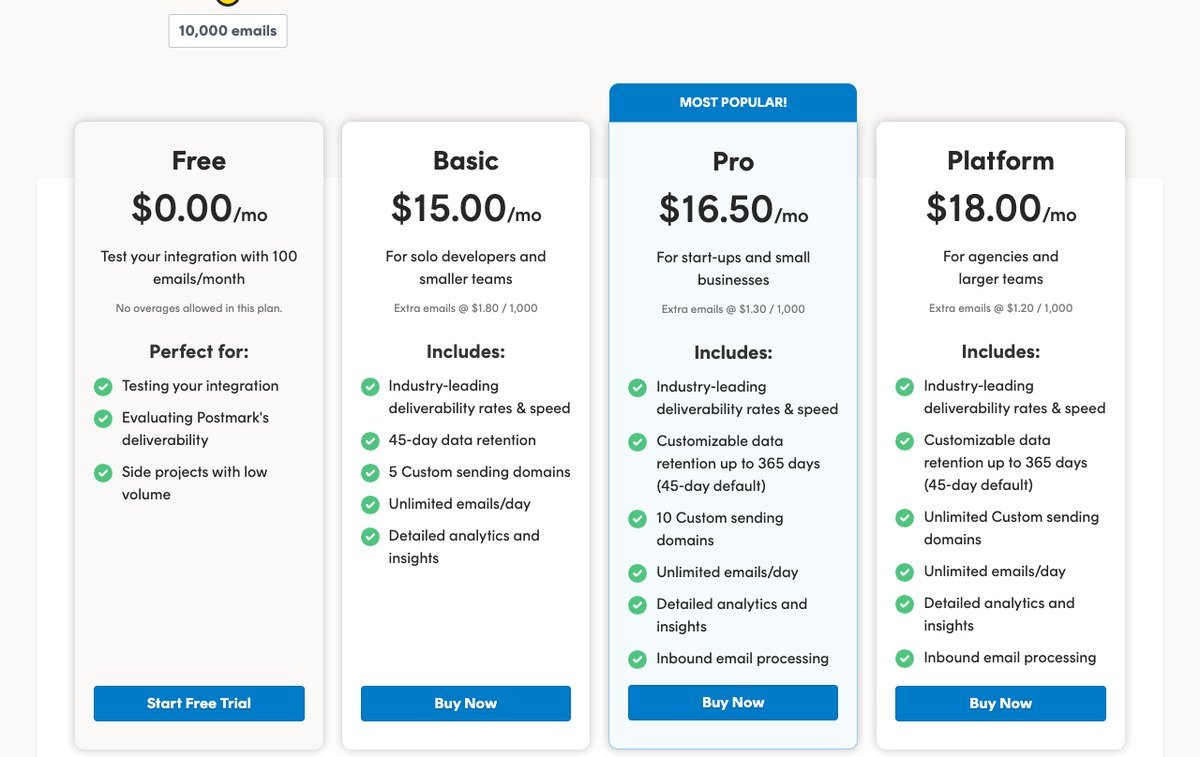
Free tier 100 emails a month. Entry plan Basic at $15 a month for 10,000. Overage $1.80 per 1,000. Owned by ActiveCampaign.
Postmark keeps transactional traffic on separate message streams from bulk sending, which is the whole reason its delivery speed holds up when a marketing blast goes out on the same account. Every plan carries an unlimited daily ceiling, so a sudden spike in signups will not throttle your verification codes.
Price climbs fast with volume. The same Basic plan runs $55 a month at 50,000 emails and $115 at 125,000, against $20 and $30 on cheaper rivals. You pay for 45 days of full message content, granular bounce data and a dedicated IP option from $50 a month per IP once you clear 300,000 a month.
2. Amazon SES: The Cheapest Per Email by a Wide Margin
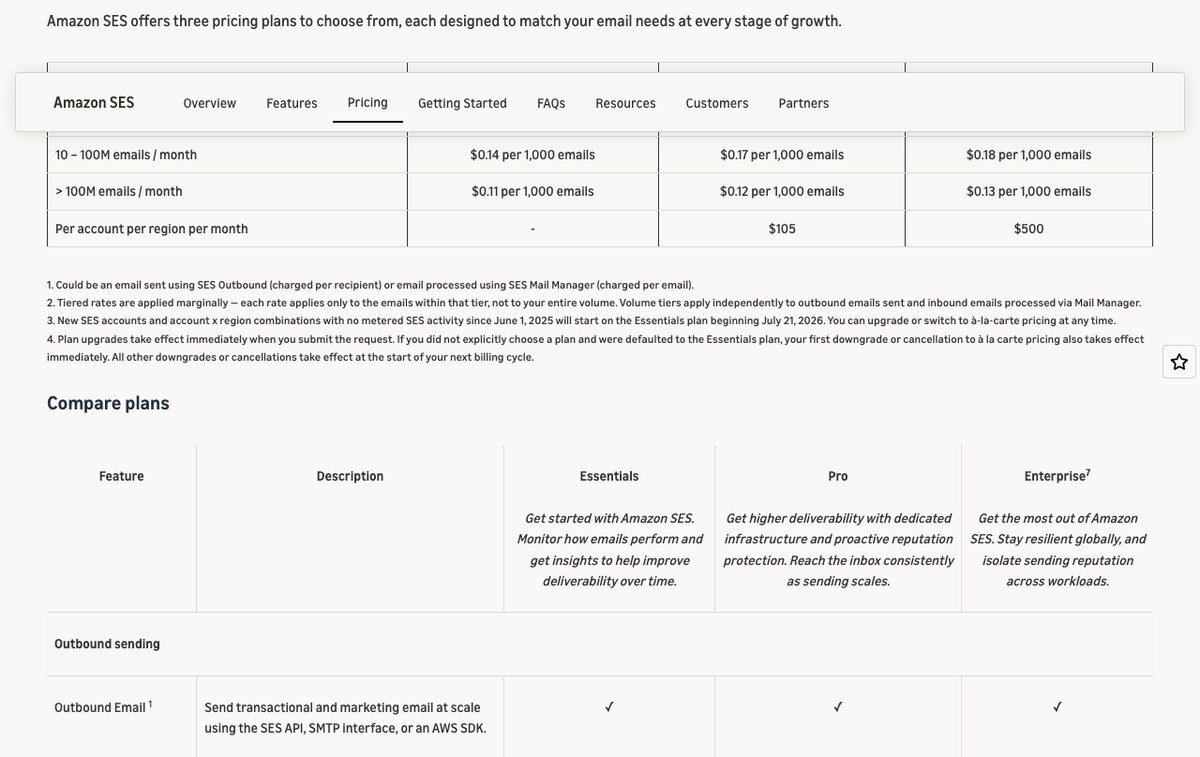
No free tier. A la carte $0.10 per 1,000 emails. Essentials plan $0.16 per 1,000. Dedicated IP from $24.95 a month.
Nothing else comes close on raw price. Fifty thousand emails cost $5.00 on the a la carte rate, where the next cheapest managed plan starts at $19.95. Attachments add $0.12 per GB, and inbound processing is billed separately through Mail Manager at $0.15 per 1,000.
The catch is the setup, and a pricing change that landed this year. Since 21 July 2026 new SES accounts start on the Essentials plan at $0.16 per 1,000 rather than the $0.10 a la carte rate, and you have to switch deliberately to get the lower number. There is also no standing free allowance any more: new AWS customers get up to $200 in Free Tier credits and a free plan for six months.
3. Resend: The Easiest API to Wire Up in an Afternoon
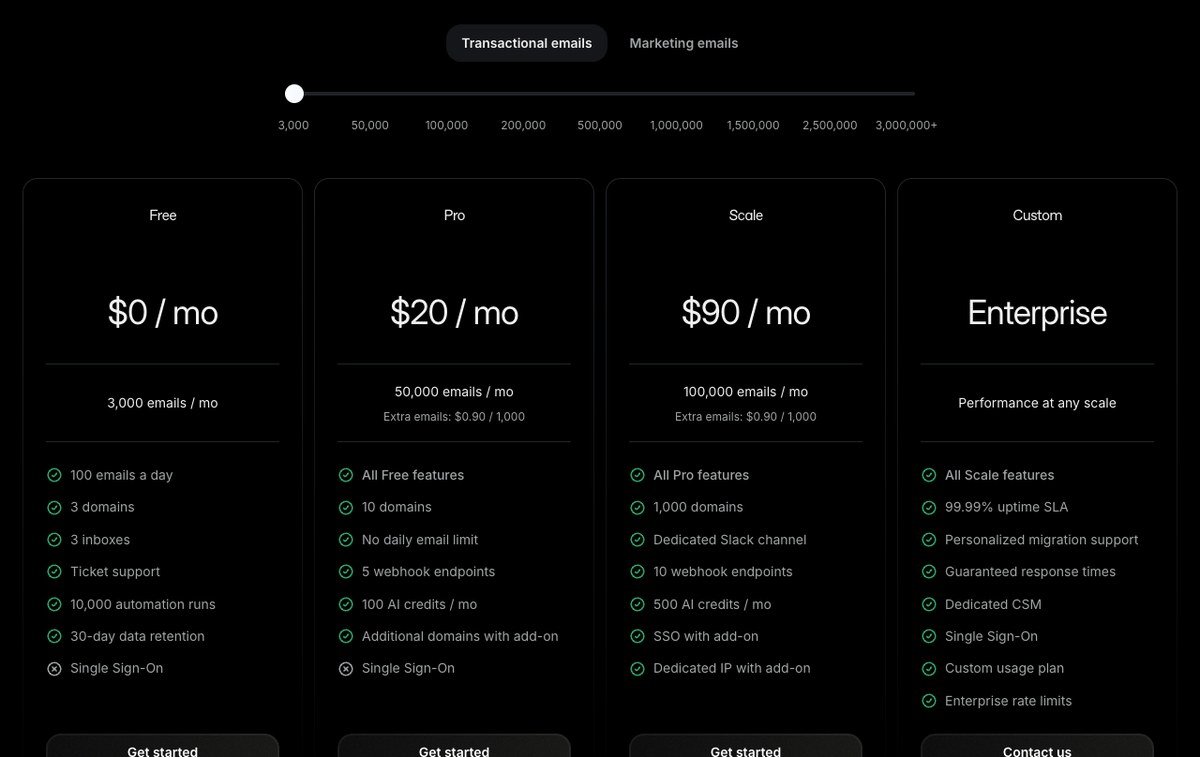
Free tier 3,000 emails a month, capped at 100 a day. Entry plan Pro at $20 a month for 50,000. Overage $0.90 per 1,000.
Resend charges $0.90 per 1,000 beyond the plan, the lowest overage rate on any entry tier among these providers, and the free plan is generous enough to run a small production app. Three sending domains, three inboxes and 30 days of data retention come with the $0 tier, which is more than Postmark or MailerSend give away.
It suits teams writing their templates in code rather than clicking them together. The Scale plan at $90 a month covers 100,000 emails and 1,000 domains, and a dedicated IP is a $30 monthly add-on once you pass 3,000 emails a day. Single sign-on is a steep $150 a month on top.
4. Mailgun: Inbound Routing and Validation in One Account
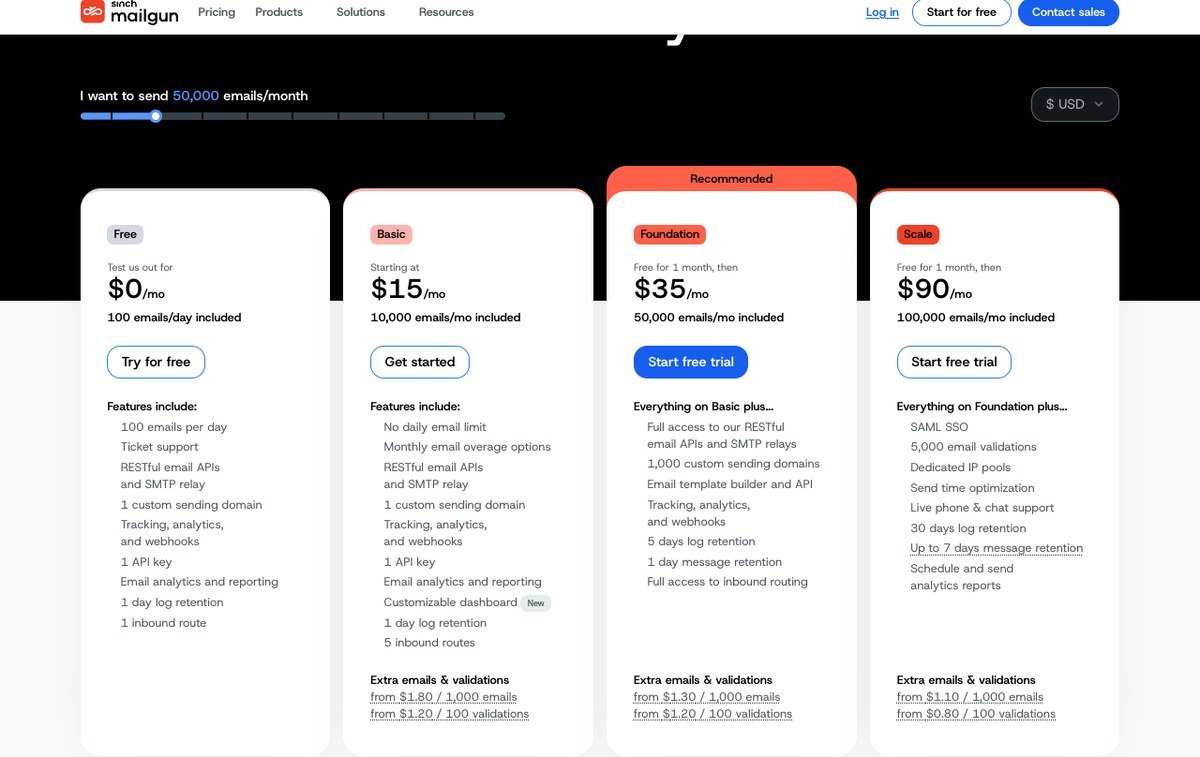
Free tier 100 emails a day. Entry plan Basic at $15 a month for 10,000. Overage from $1.80 per 1,000. Owned by Sinch.
Mailgun earns its place on API depth rather than price. Inbound routes, message parsing, webhooks and address validation all sit in the same account, so an app that receives replies as well as sending does not need a second vendor.
Log retention is the thing to watch. The Basic plan keeps one day of logs and allows one sending domain, which is thin for debugging a live service. Foundation at $35 a month lifts that to five days and 1,000 domains with overage at $1.30 per 1,000, and Scale at $90 a month covers 100,000 emails with 30 days of logs, dedicated IP pools and SAML single sign-on.
5. Twilio SendGrid: Volume Infrastructure, No Free Plan Left
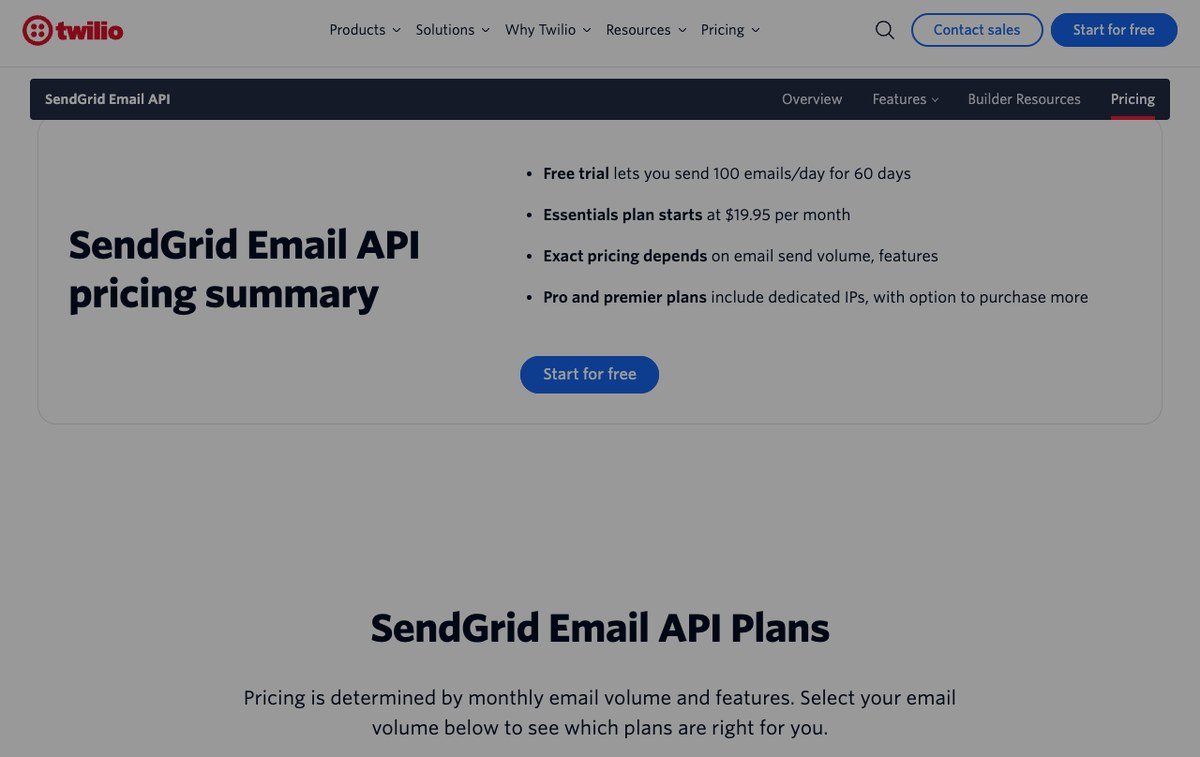
No ongoing free plan. 60-day trial at 100 emails a day. Essentials from $19.95 a month for 50,000 to 100,000. Pro from $89.95.
The long-running free tier is gone. New accounts get 100 emails a day for 60 days, after which Essentials starts at $19.95 a month, and the sendgrid.com domain itself now redirects to Twilio.
What you buy at the Pro tier is scale and a dedicated IP in the base price, along with 2,500 free address validations and seven days of searchable activity. Essentials and the trial keep only three days of activity history, which is short when a customer asks why a receipt never arrived.
6. Brevo: Transactional and Marketing Mail on One Bill
Free tier 300 emails a day, or 9,000 a month. Entry plan Starter from $17 a month covering 10,000 emails. $56 a month at 50,000.
Brevo is the pick when the same team sends receipts and newsletters and does not want two vendors. Campaign and transactional volume draw on one monthly allowance, and SMS and WhatsApp sit alongside email in the same account. If you are weighing it against a dedicated campaign tool, our roundup of Mailchimp alternatives covers the marketing side in detail.
Three hundred a day is the largest daily allowance any of these providers gives away, though the Brevo footer stays on your emails until you pay $10.80 a month to remove it. Brevo shows prices in the visitor’s local currency, so set the switcher to US dollars before comparing. Professional jumps to $499 a month and starts at 150,000 emails.
7. MailerSend: Template Building Without a Developer
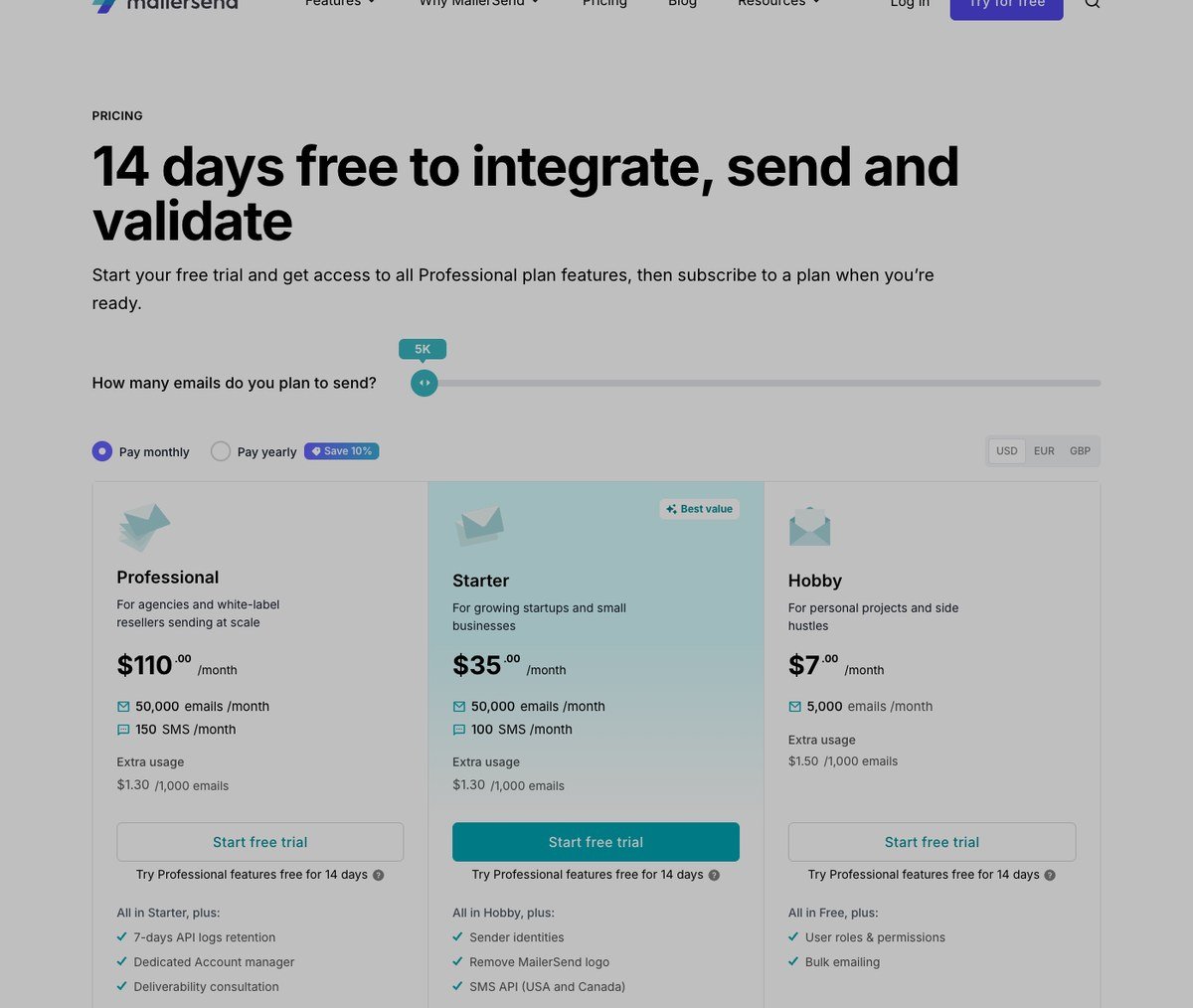
Free tier 500 emails a month. Entry plan Hobby at $7 a month for 5,000. Overage $1.50 per 1,000. Built by the MailerLite team.
At $7 a month, Hobby undercuts every other paid entry plan among these providers, and the drag-and-drop builder means a support lead can change the wording of a shipping notification without opening a pull request. Starter at $35 a month covers 50,000 emails with ten domains and 250 templates.
Two limits deserve attention before you commit. The free plan is 500 emails a month, and it allows a single template, one domain and 100 API requests a day. Dedicated IPs are Enterprise only, reserved for senders above 100,000 emails a week.
8. SMTP2GO: A Plain Relay That Needs No Code Changes
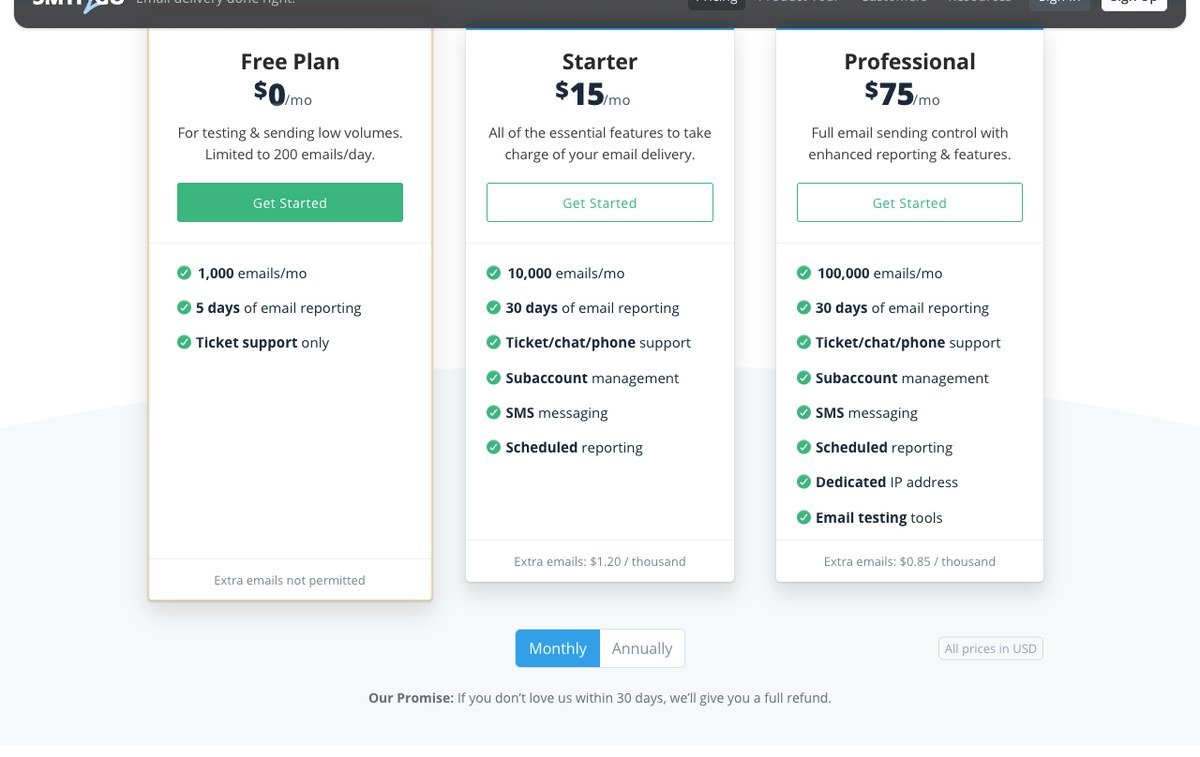
Free tier 1,000 emails a month, capped at 200 a day. Entry plan Starter at $15 a month for 10,000. Overage $1.20 per 1,000.
If your application already speaks SMTP, SMTP2GO is the shortest route off a shared host. Automatic DKIM and SPF, feedback loops, blocklist monitoring and spamtrap detection come on every plan including the free one, and support runs through ticket, chat and phone rather than a forum.
The Professional plan at $75 a month covers 100,000 emails and includes a dedicated IP address and email testing tools, with extra traffic at $0.85 per 1,000. Reporting history is the main tier difference: five days on free against 30 days on both paid plans.
9. Mailjet: The Largest Free Monthly Allowance
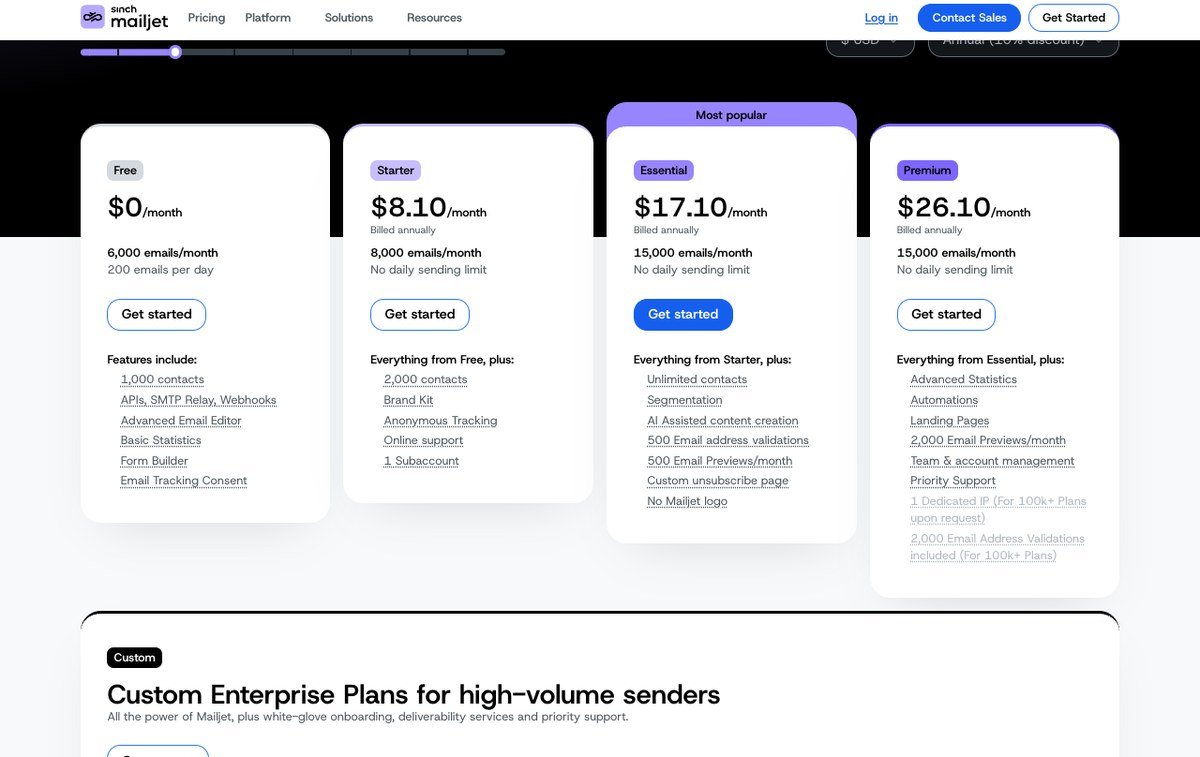
Free tier 6,000 emails a month, capped at 200 a day. Entry plan Starter at $9 a month for 8,000. Owned by Sinch.
Six thousand free emails a month is the biggest no-cost monthly ceiling among these providers, and it comes with the send API, SMTP relay, webhooks, 1,000 contacts and the email editor rather than a crippled subset. For a side project that sends a few hundred receipts a week, the bill stays at zero.
Paid tiers are priced for marketing teams as much as developers. Essential runs $40 a month at 50,000 emails with segmentation, 500 address validations and the Mailjet logo removed, and Premium is $59 at the same volume with automations, landing pages and priority support. Annual billing takes 10% off.
10. Mailtrap: Test the Email Before It Reaches a Customer
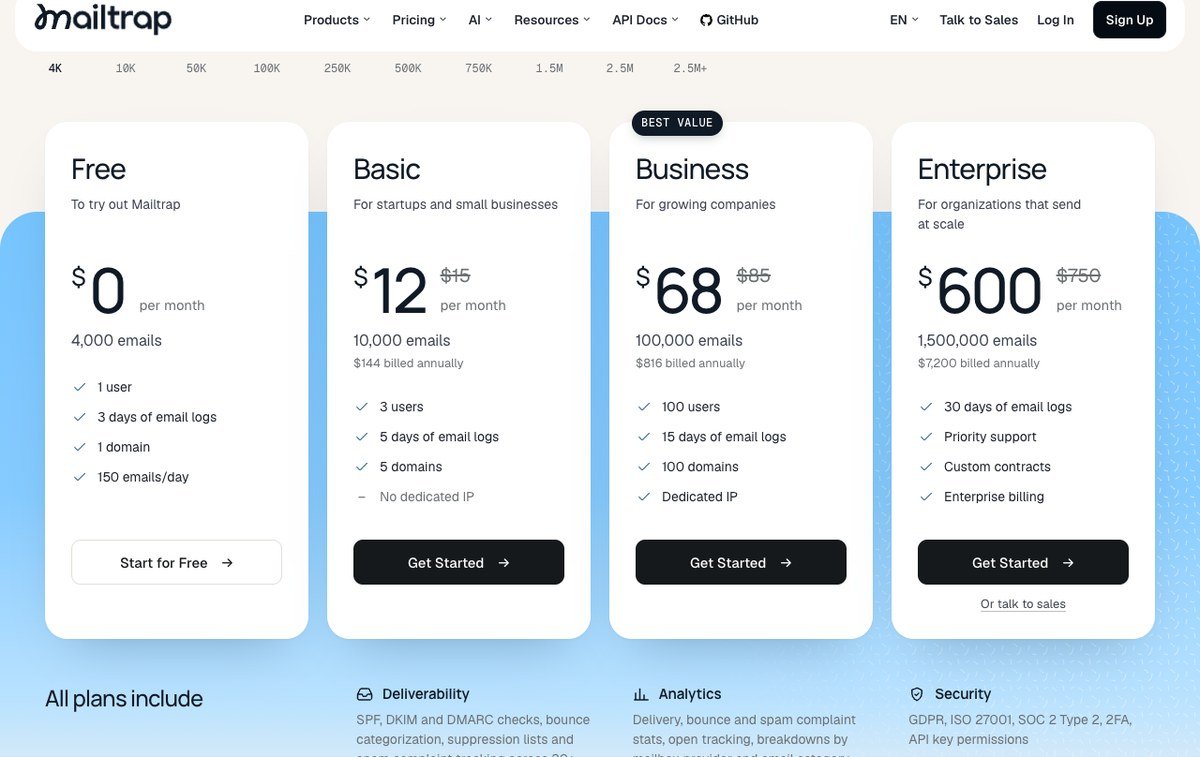
Free tier 4,000 emails a month, capped at 150 a day. Entry plan Basic at $15 a month for 10,000. Overage $1.00 per 1,000.
Mailtrap started as a sandbox that catches outgoing mail in staging, and that heritage is the reason to choose it: one vendor covers the fake inbox your test suite targets in staging and the real sending path in production. Every plan carries SPF, DKIM and DMARC checks, bounce categorisation and SOC 2 Type 2.
Read the pricing carefully, because the three products are billed separately and a sending plan does not include the sandbox. On sending alone, Basic scales $15 for 10,000, $20 for 50,000 and $30 for 100,000 emails a month, while Business at $85 buys the dedicated IP, automatic warm-up and single sign-on at the same 100,000 ceiling.
What 50,000 Emails a Month Costs Across These Services
Fifty thousand messages is the volume where the cheap entry plans run out and the real gap opens. On the plan that covers that volume outright, the monthly bill runs from $5.00 to $56, an eleven-fold spread for traffic that looks identical from the outside.
- Amazon SES, a la carte: $5.00, or $8.00 on the Essentials plan rate
- Twilio SendGrid Essentials: from $19.95
- Resend Pro: $20
- Mailtrap Basic: $20
- Mailgun Foundation: $35
- MailerSend Starter: $35
- Mailjet Essential: $40
- Postmark Basic: $55
- Brevo Starter: $56
SMTP2GO has no 50,000 step at all: it charges $15 for 10,000 emails and $75 for 100,000, with extra traffic at $1.20 per 1,000. What the spread buys at the top end is retention and support rather than delivery itself: Postmark keeps 45 days of full message content, while Mailgun Basic keeps one day.
Free Plans Ranked by What You Can Actually Send
Free tiers in this category are shaped by a daily cap as often as a monthly one, and the daily cap is what breaks a launch. A plan offering 3,000 emails a month at 100 a day will not absorb 400 signups in one afternoon.
- Brevo: 300 a day, which works out at 9,000 a month
- Mailjet: 6,000 a month, capped at 200 a day
- Mailtrap: 4,000 a month, capped at 150 a day
- Resend: 3,000 a month, capped at 100 a day
- Mailgun: 100 a day, with one day of log retention
- SMTP2GO: 1,000 a month, capped at 200 a day
- MailerSend: 500 a month, one domain and one template
- Postmark: 100 a month, with no overage permitted
Amazon SES has no standing free allowance at all, and Twilio SendGrid replaced its free plan with a 60-day trial at 100 emails a day. Both matter if you are sizing a launch around a free tier.
SMTP Relay or Email API: Which One to Wire Up
Every provider named offers both, and the choice is about how much control you want over the message rather than how well it will be delivered.
- SMTP relay. Change a host, port, username and password in your existing mail configuration and you are sending. Nothing in the application code changes, which makes it the right answer for WordPress, Django defaults or any off-the-shelf platform.
- REST API. One HTTPS call per send, with template rendering, variable substitution, batching, scheduling, tagging and attachments handled by the provider. It avoids the several round trips an SMTP handshake costs and returns a message ID you can match to webhook events.
Teams running both usually point background jobs and bulk notifications at the API and leave the framework default on SMTP as a fallback. If the application is a chat or commerce platform rather than a classic web app, the same reasoning applies to the messaging channel, and the WhatsApp Business API providers comparison covers that side.
What Gmail Requires From Every Sender
Since 1 February 2024, mail sent to Gmail accounts has to clear a published bar, and a second, stricter bar applies above 5,000 messages a day. A transactional email service handles most of it, but the DNS records are yours to publish.
- SPF or DKIM authentication on every sending domain, and both of them above 5,000 a day
- Valid forward and reverse DNS records on the sending domain or IP
- TLS on the connection that carries the message
- A spam rate below 0.3% in Postmaster Tools, and below 0.10% for large senders
- A DMARC policy on the sending domain, with the From header aligned to SPF or DKIM, above 5,000 a day
- Messages formatted to RFC 5322, with no Gmail From header impersonation
Postmark, Mailtrap and MailerSend all build DMARC monitoring into the product, at $14 a month per domain on Postmark and included on the higher MailerSend tiers. SMTP2GO handles DKIM and SPF setup automatically on every plan including the free one.
Four Things That Separate These Services
Delivery rates quoted in marketing copy are not comparable, because no two providers measure them the same way. These four differences show up on the bill and in the dashboard instead.
- Overage rate. The price of the first 1,000 emails past an entry plan runs from $0.90 on Resend to $1.80 on Postmark and Mailgun, a difference that compounds quickly on a spiky sending pattern.
- Log retention. Postmark keeps 45 days of full message content by default. Mailgun Basic and MailerSend Hobby keep one day. This is the single biggest practical gap between a cheap plan and an expensive one.
- Daily ceiling. Free and entry plans on Brevo, Mailjet, Mailtrap, Resend and SMTP2GO all cap sending per day as well as per month. Postmark removes the daily cap on every plan including the free one.
- Dedicated IP cost. Amazon SES charges $24.95 a month per IP, Resend $30 and Postmark $50, while SMTP2GO Professional and Mailtrap Business include one in the plan price.
How to Pick the Plan That Fits Your Volume
- Count what you actually send in a busy month, then add the retry traffic. Bounced and deferred messages count against your allowance on most plans.
- Check the daily cap, not just the monthly one. A product launch concentrates a month of signups into two days.
- Price the overage, not the plan. A $15 plan with a $1.80 overage costs more at 25,000 emails than a $35 plan with the volume included.
- Decide whether anyone outside engineering edits the templates. If so, MailerSend, Brevo and Mailjet ship a visual builder; Resend and Amazon SES do not.
- Confirm the log retention window matches how long your support queue takes to reach a delivery question. One day is rarely enough.
Frequently Asked Questions
Do transactional emails need an unsubscribe link?
No. The one-click unsubscribe requirement that large senders must meet applies to marketing and subscribed messages. A password reset, a receipt or a verification code is triggered by the recipient’s own action and falls outside it. Every other sender rule, including authentication and the spam rate ceiling, still applies to that traffic.
What is the cheapest transactional email service?
Amazon SES on the a la carte rate, at $0.10 per 1,000 emails, which puts 50,000 messages at $5.00 a month. The trade-off is engineering time: there is no free allowance, no template builder and no guided onboarding. Among managed services, MailerSend Hobby at $7 a month for 5,000 emails is the cheapest paid entry point.
Can I run a production app on a free plan?
Up to a point. Brevo allows 300 emails a day, Mailjet 6,000 a month and Mailtrap 4,000 a month, which covers a small app comfortably. The limits that bite first are the daily cap and log retention: Mailgun keeps one day of logs even on paid Basic, and Mailtrap free keeps three.
Should I use SMTP or the email API?
Use SMTP when the application or platform already sends mail and you only need to repoint it, which is a configuration change rather than a code change. Use the REST API when you want template rendering, batch sending, scheduling, tagging and webhook events, and when you care about the extra round trips that SMTP costs on every message.
Related Articles

Get the Fox Bulletin briefing
The stories that matter, in your inbox. No spam, unsubscribe anytime.
Newsletter signup will be available soon.
Related stories
PayPal Alternatives: 10 Options With Lower Fees
PayPal charges 3.49% plus 49 cents on a US checkout payment. Ten alternatives, with the rate each one publishes.

Bitcoin Price Prediction: BTC Rebuilds From $55,130
Bitcoin is near $61,700 after a low of $55,130. The levels holding the range, the ETF withdrawals behind the fall, and what has to break next.

Ethereum Price Prediction: ETH Rebuilds From $1,538
Ether is near $1,730 after a low of $1,538. The levels holding the range together, the run of ETF withdrawals behind the fall, and what a move back to $2,000 needs.