

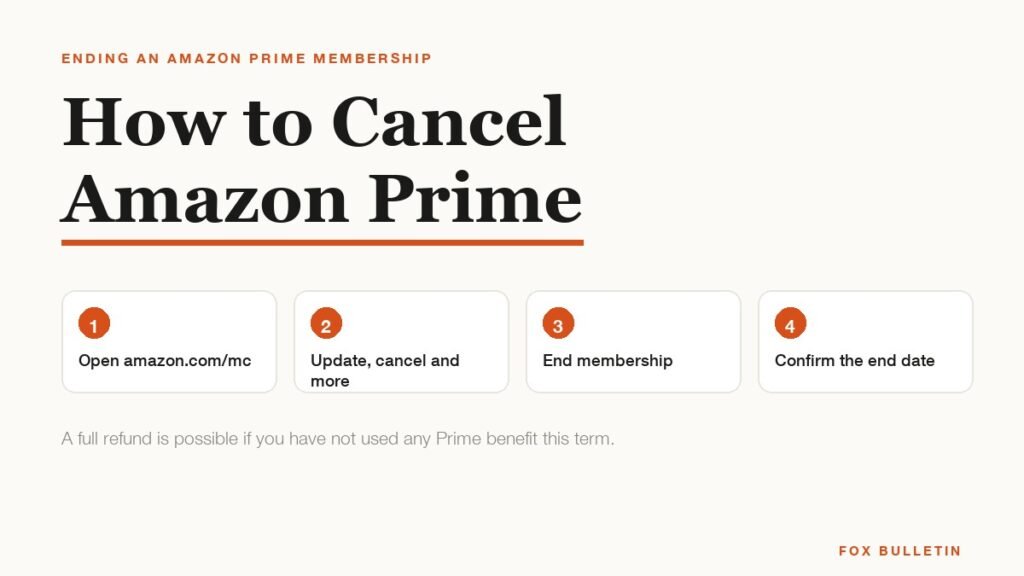
Cancelling Amazon Prime takes about a minute and happens entirely at amazon.com/mc. There is no phone call, no form and no notice period. The only part that needs attention is the refund, because whether you get one depends on something most people do not realise they have already done.
Prime costs $14.99 a month or $139 a year, so the decision is worth getting right rather than letting it roll. Here are the steps, the exact point at which the charges stop, and the rule that decides whether any money comes back.
How to Cancel Amazon Prime in Four Steps
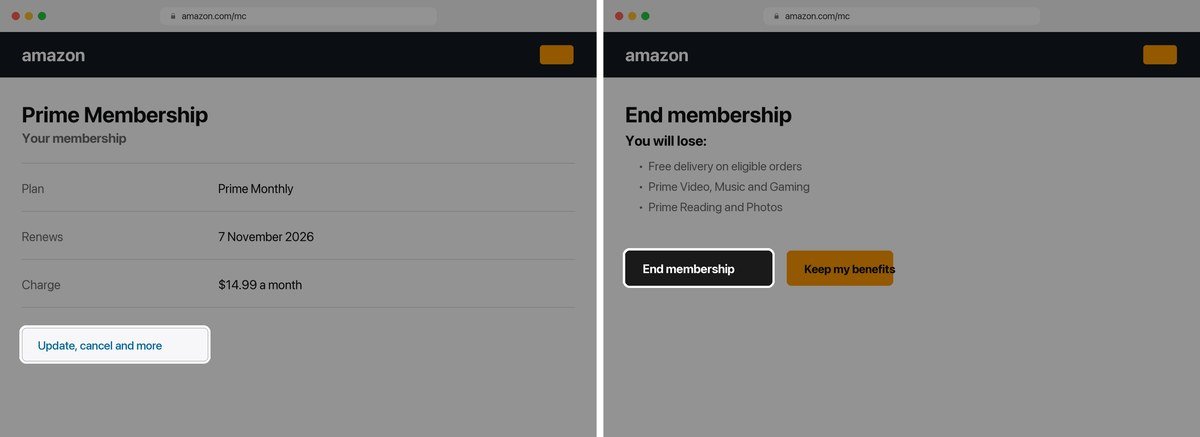
- Go to amazon.com/mc and sign in. This is the Manage Your Prime Membership page and it is far quicker than navigating the account menus.
- Select Update, cancel and more, then End membership.
- Work through the retention screens. Amazon will list the benefits you are giving up and offer to pause instead or remind you before renewal. Keep choosing the option that ends the membership.
- Choose whether to end immediately or at the renewal date, then confirm. The page should state the date your benefits stop.
The flow is the same in the mobile app, though the browser version states the end date more plainly. Cancelling applies to the whole account rather than the device you did it on, so there is nothing to repeat elsewhere.
When the Charges Actually Stop
This is where the two options genuinely differ, and picking the wrong one either wastes money you have paid or ends benefits sooner than you needed.
- End at the renewal date. Nothing is refunded because nothing is unused. You keep every benefit until the period you already paid for runs out, and no further charge is taken. This is the right default.
- End immediately. Benefits stop now, and whether you see money back depends entirely on the refund rule below.
There is no cancellation fee either way, and no minimum term. If you are only cancelling to avoid the next charge, choosing the renewal date costs you nothing and keeps the benefits you have already bought.
The Refund Rule Most People Get Wrong
Amazon does not decide refunds on how far into the term you are. It decides on whether you have used the membership, and the definition of used is broader than people expect.
| What you have used this term | Refund position |
|---|---|
| Nothing at all | Eligible for a full refund |
| Only Prime delivery | May be eligible for a partial refund |
| Prime Video, Music, Gaming or Reading | Not eligible for a refund |
That third row catches almost everyone. Watching a single episode on Prime Video counts as using the membership, which means a subscriber who streamed one thing in week one and nothing since has no refund claim at all. If you intend to ask for money back, do it before you open any of the entertainment services, not after.
What You Lose the Moment It Ends
Prime is a bundle, and cancelling removes all of it at once. The delivery benefit is the one people think about and rarely the one they miss.
- Free and fast delivery on eligible orders, which reverts to paid shipping or an order minimum.
- Prime Video, including anything in your watchlist and any Channels you subscribed to through it.
- Prime Music, Prime Reading and Photos, including the unlimited photo storage, which is the one that causes real problems if you have been relying on it.
- Prime Gaming and the monthly game claims attached to it.
- The free Duo tier of Amazon Business Prime, if you were using one.
Download anything you need from Photos before the end date rather than after. Storage reverts to the free allowance and material above it becomes inaccessible, which is a far more disruptive loss than paying for postage.
Keeping the Part You Actually Use
A large share of cancellations come from people who only ever used Prime for television, and they are paying $14.99 a month for a bundle to get at one piece of it. There is a cheaper route that does not involve cancelling blind.
Prime Video sells as a standalone subscription at $8.99 a month with no Prime membership attached. It carries the same catalogue and loses only the shipping and the other member benefits, so a household that cancels Prime and takes Prime Video on its own instead pays six dollars less every month for the thing it was actually watching. Our breakdown of the Amazon Prime Video subscription sets out every tier if you want to compare before deciding.
The same logic applies in reverse. If you cancel and find you are paying for delivery repeatedly, the annual plan at $139 works out at about $11.58 a month and is cheaper than monthly billing for anyone keeping it past four months.
Cancelling When You Did Not Sign Up on Amazon
A Prime charge does not always come from a membership you started at amazon.com, and the cancel page will not help if it did not. Three cases behave differently.
- A free trial you forgot. Trials convert silently into paid memberships. The cancel flow is identical, and a trial cancelled before it converts costs nothing at all.
- An invite from someone else’s household. If you were added to a family or household plan, you are not the billed member and there is nothing for you to cancel. The account holder has to remove you, or you leave the household from your own settings.
- A charge you do not recognise. Check whether a different household member holds the account before assuming fraud. Prime renewals often appear on a statement months after signup, long enough that the original purchase has been forgotten.
The discounted tiers are also worth checking before you cancel outright, because the reason for cancelling is usually price rather than the service. Prime for Young Adults is $7.49 a month for anyone aged 18 to 24 or in study, and Prime Access is $6.99 for recipients of qualifying government assistance. Both carry the identical membership at roughly half the standard rate, and switching to one of them solves the cost problem without losing anything.
Pausing and the Reminder Option
Amazon offers two alternatives inside the cancellation flow, and both are genuinely useful rather than pure retention theatre.
- Pause holds the membership without charging, which suits someone who orders heavily in some months and not at all in others.
- Remind me before renewal keeps the membership live but sends a warning before the next charge, which solves the common problem of forgetting an annual renewal entirely.
If you are cancelling because a charge surprised you rather than because the service is not worth it, the reminder option addresses the actual problem. For anything that proves awkward to stop, the FTC’s guidance on stopping automatic payments explains the options, and the same approach applies to the rest of a household streaming stack worth reviewing.
What Happens to Orders and Subscriptions Already in Flight
Cancelling does not reach backwards into things you have already set up, and a few of them keep running in ways that surprise people.
- Orders already placed ship as normal at the speed you selected. You do not lose delivery you have already paid for.
- Prime Video Channels are separate paid subscriptions billed through Amazon, and they do not stop when Prime does. Each one has to be cancelled on its own or it keeps charging.
- Subscribe and Save deliveries continue, since that programme does not require Prime, though the discount tiers may change.
- Digital purchases you bought outright stay in your library. Only the included catalogues disappear.
The Channels point is the expensive one. Someone cancelling a $14.99 membership while holding two Channel subscriptions at ten dollars each has cut the smallest line on the bill and left the larger one running. Check the Channels list before you cancel the membership, not after.
Frequently Asked Questions
How do you cancel Amazon Prime?
Go to amazon.com/mc, select Update, cancel and more, then End membership, and work through the retention screens until Amazon confirms the end date. It takes about a minute and there is no cancellation fee.
Do you get a refund when you cancel Amazon Prime?
Only if you have not used the benefits this term. A member who has used nothing is eligible for a full refund, one who has used only delivery may get a partial refund, and one who has opened Prime Video, Music, Gaming or Reading is not eligible at all.
Does cancelling Amazon Prime stop it immediately?
Only if you choose that option. You can end immediately or let the membership run to its renewal date. Ending at renewal keeps every benefit you have already paid for and still stops the next charge, which is usually the better choice.
Can you keep Prime Video without Amazon Prime?
Yes. Amazon Prime costs $8.99 a month as a standalone subscription with no Prime membership. You keep the catalogue and lose the shipping and other member benefits, which suits anyone whose Prime was really a television subscription.
Related Articles

Get the Fox Bulletin briefing
The stories that matter, in your inbox. No spam, unsubscribe anytime.
Newsletter signup will be available soon.
Related stories
Airbus A380: Size, Range and Who Still Flies It
The largest passenger aircraft ever flown measures 72.72 m long and 79.75 m across the wings. Its specifications, the two decks, why production ended at 251 aircraft, and which airlines still fly it.
Apple Creator Studio: Price and the New AI Tools
Generate Fill in Pixelmator Pro, an AI assistant in Logic Pro and MotionVFX in Final Cut. A free update for subscribers.
Apple Home Collection: Every Accessory and Price
Cameras, a smart lock and two thermostats, built by LG and Schneider Electric and sold by Apple.