

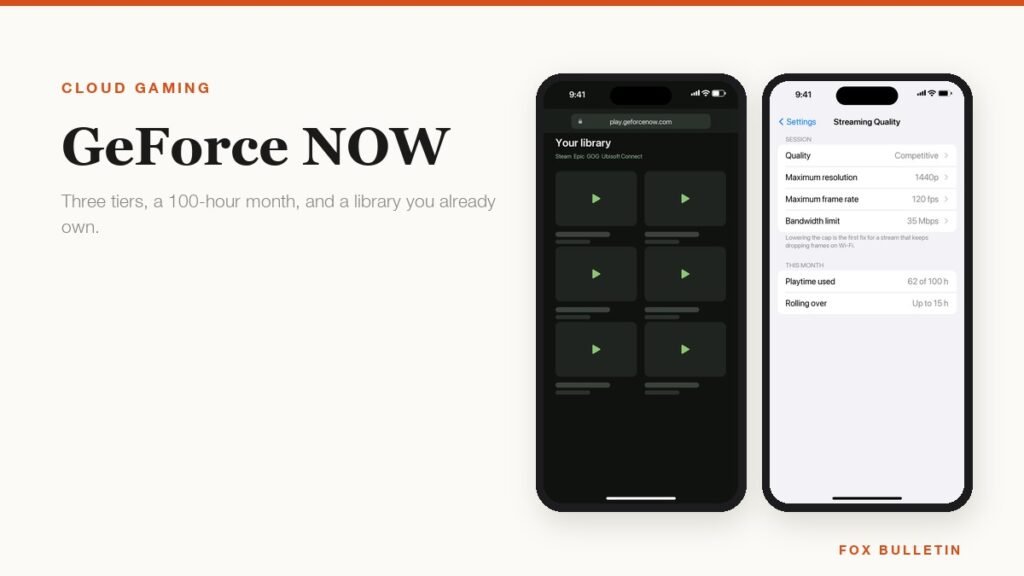
GeForce NOW is the odd one out among cloud services, because it does not come with a catalogue. What you rent is a gaming PC in a data centre, and what you play on it are the games already sitting in your Steam, Epic, GOG, Ubisoft Connect or PC Game Pass accounts. NVIDIA puts the number of supported titles above 4,500, and every one of them is a game you buy or already own rather than one the subscription hands you.
That changes who it suits. Someone with a decade of Steam purchases and a laptop that cannot run any of them gets enormous value. Someone starting from nothing is paying for horsepower with no games to point it at. The tiers, the session limits and the monthly hour allowance all follow from that, so they are worth understanding before the free trial runs out.
The three tiers and what separates them
Free, Performance and Ultimate differ on four axes: how long a single session lasts, how quickly you get a server, what resolution the stream tops out at, and which class of graphics card you are actually borrowing.
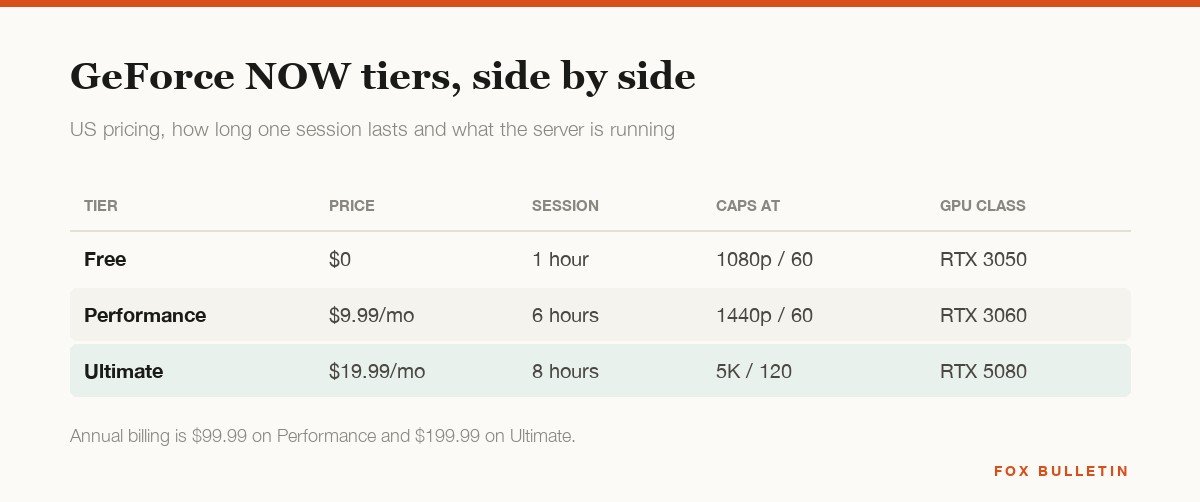
The free tier is a demonstration rather than a plan. Sessions end after an hour, you wait in a queue behind paying members, and the wait is ad-supported. It is genuinely useful for testing whether your connection is good enough before you spend anything, which is the sensible way to start.
Performance at $9.99 a month is the tier most people should look at first. Six-hour sessions, priority queueing, no ads, 1440p at 60 frames per second and ray tracing on an RTX 3060-class machine is more than most laptops in the house can manage. Ultimate at $19.99 buys an RTX 5080-class rig, eight-hour sessions and streams up to 5K at 120 frames per second, which only pays off on a large high-refresh display and a very good connection. Annual billing brings both down to ten months of cost.
The 100-hour month, and what happens when it runs out
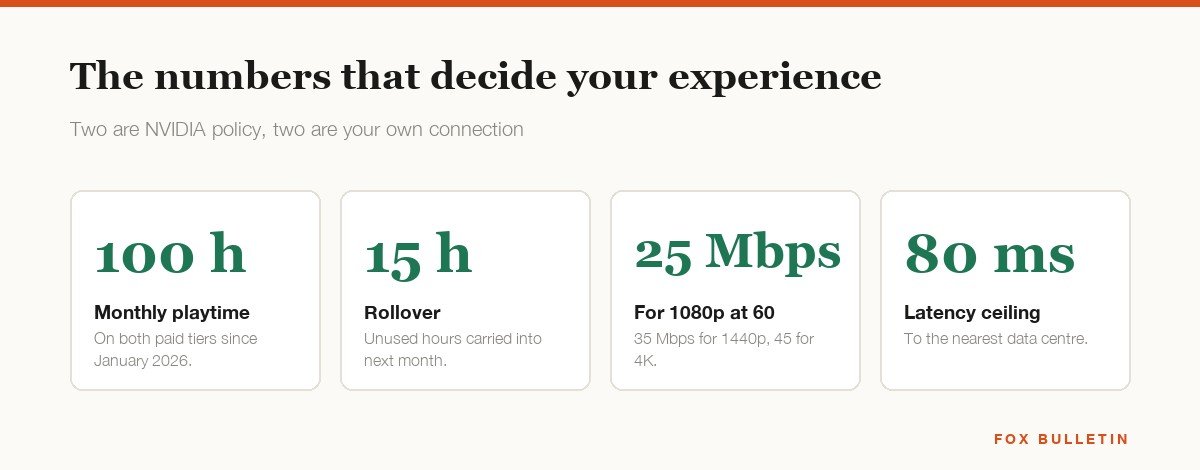
Since January 2026 both paid tiers carry a monthly playtime allowance of 100 hours. Up to 15 unused hours roll into the following month, and once you are out you buy more in 15-hour blocks from the account portal, priced at $2.99 on Performance and $5.99 on Ultimate.
A hundred hours is about three and a quarter hours every day of the month, so the cap is invisible to most people and immediate for a few. The group it actually catches is households sharing one account across several people, since the allowance belongs to the membership rather than the person holding the controller. Worth noting against the alternatives: the comparable Microsoft service now lists cloud playtime in single-figure hours per month, which our guide to Xbox Cloud Gaming sets out in full.
What your connection has to do
NVIDIA publishes a figure per resolution rather than one blanket number, and its system requirements page lists 15 Mbps for 720p at 60 frames, 25 Mbps for 1080p at 60, 35 Mbps for 1440p at 120 and 45 Mbps for 4K at 120. Ethernet is preferred, 5 GHz Wi-Fi is fine, and 2.4 GHz is the usual reason a stream looks soft and stutters on an otherwise fast line.
The number that matters more than any of those is latency to the nearest data centre, which should sit under 80 milliseconds. Bandwidth decides how the picture looks, latency decides how the game feels, and no amount of the first fixes a shortage of the second. The in-app overlay reports both while you play, and it is the first place to look when something feels wrong.
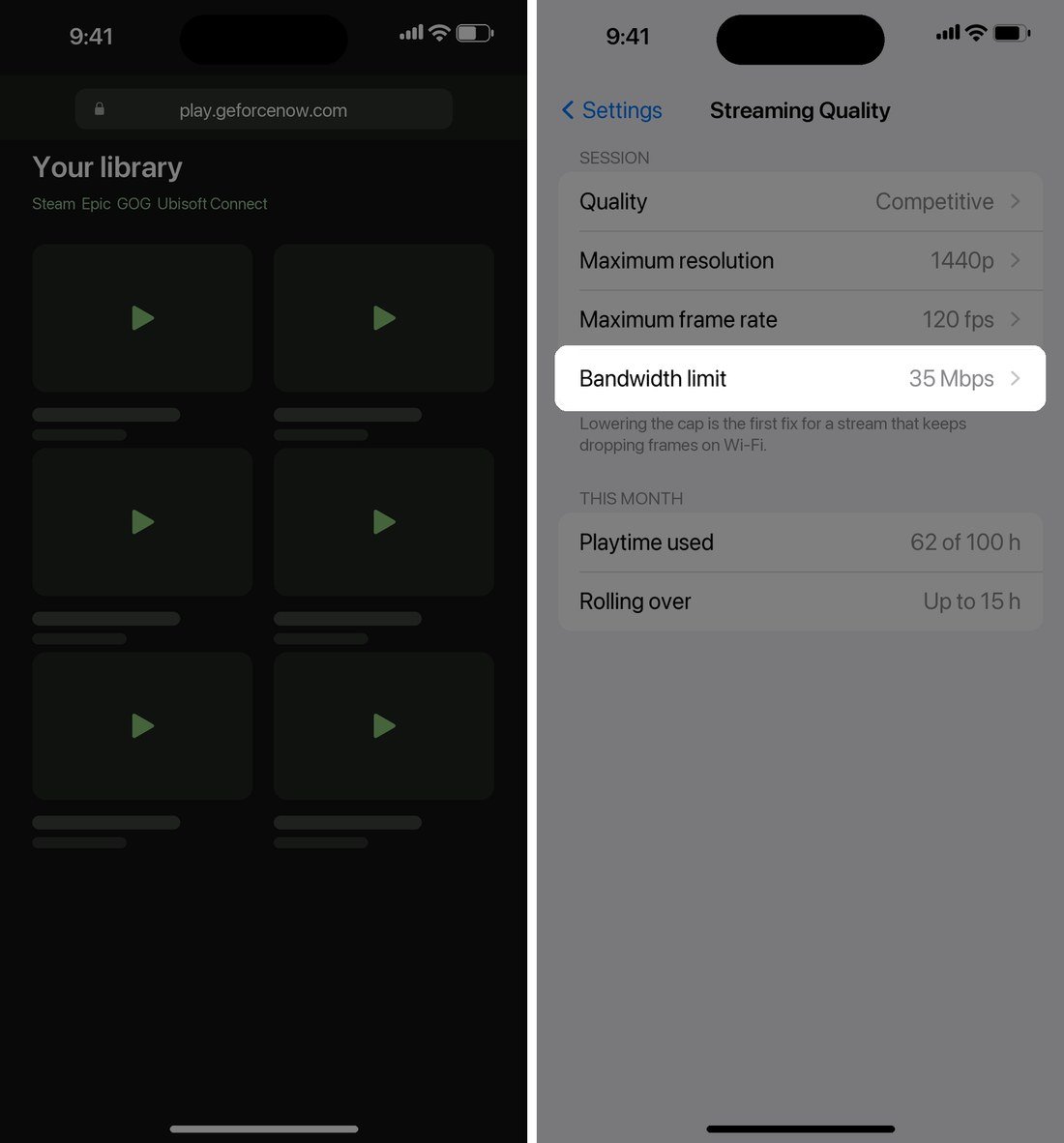
Dropping the bandwidth limit or the resolution cap in the streaming quality settings is the fastest fix for a stream that keeps hitching. It sounds like a downgrade and usually is not, because a clean 1080p stream looks considerably better than a 1440p one that is constantly rebuffering.
Playing on a phone, a Mac or a TV
Android, Windows, macOS and Shield TV get native apps. iPhone, iPad and most browsers go through play.geforcenow.com instead, which is a web app you add to the home screen, and the experience is the same once a controller is paired. Samsung and LG smart TVs carry the app directly, and the Steam Deck and recent VR headsets including Meta Quest and Apple Vision Pro are supported too.
- Sign in at play.geforcenow.com in Safari or Chrome, or install the app where one exists.
- Link your game stores under Settings, then Connections, so your own purchases appear in the library.
- Pair a controller over Bluetooth before launching anything, since the browser binds it on first input.
- Open Streaming Quality and set a bandwidth limit that matches your line rather than leaving it on automatic.
- Check the game you want is on the supported list, because library size is not the same as everything you own being playable.
Streaming for an hour works a phone about as hard as a native game does, so the usual heat advice applies. If your handset throttles partway through a session, our guide to stopping a phone overheating covers the settings that buy back the most headroom.
Instant play, Install-to-Play and the library you actually get
The supported list is not one list. A large portion of the catalogue is instantly playable, which means NVIDIA keeps the game patched and ready on its servers and you are in it within seconds of clicking. Everything else that is supported falls under Install-to-Play, where the game installs to cache storage attached to your session before it launches.
The practical difference is a wait at the start and a question of what survives between sessions. Paid members get 100 GB of cache for Steam titles, which holds a handful of modern games at once, and persistent storage can be added monthly if you would rather nothing was evicted. A game that drops out of the cache simply reinstalls next time, which costs minutes rather than progress, because saves live in your Steam account rather than on the server.
This is also why checking the list matters more here than on a service with a fixed catalogue. Publishers opt in title by title, and a few large ones have stayed out entirely, so owning a game on Steam is not a guarantee it streams. Search the specific games you care about before subscribing, and treat the headline figure of more than 4,500 titles as the ceiling rather than your personal library.
Mods, launchers and anti-cheat all behave differently from a local install too. Some games accept Steam Workshop content and some do not, a few competitive titles block cloud sessions outright at the anti-cheat layer, and anything requiring a third-party launcher adds a sign-in step each session. None of that is a problem for most single-player libraries, and all of it is worth knowing before you cancel a games PC.
Where it makes sense and where it does not
The service is excellent at one specific job and poor at a couple of others. This is the honest split.
| Your situation | Verdict | Why |
|---|---|---|
| You own a big Steam library | Strong fit | Nothing to rebuy, saves stay in your account |
| You own no PC games at all | Weak fit | The service supplies hardware, not a catalogue |
| You play a few hours a week | Strong fit | 100 hours covers roughly three hours a day |
| You play all evening, daily | Weak fit | The cap runs out and extra hours cost more |
| Your laptop is old | Strong fit | The server does the work, the laptop decodes video |
| You play competitive shooters | Weak fit | Input delay is structural on any cloud service |
Install-to-Play is the feature that quietly settles a lot of cases. Paid members get cache storage for Steam titles that are not in the instantly playable set, which widens the supported games list a long way beyond the headline catalogue. If the specific games you own are covered, this is cheaper than any laptop that could run them, and our roundup of the best gaming laptops exists mostly for the people whose games are not.
For background on how the underlying technology developed and where the tier structure came from, the reference entry on the service tracks the changes year by year.
Frequently Asked Questions
Does GeForce NOW come with games?
No. It supplies the hardware and streams games you already own on Steam, Epic, GOG, Ubisoft Connect or PC Game Pass. A handful of free-to-play titles are available to everyone, but there is no included catalogue in the way a subscription service normally works.
Is the free tier good enough?
For testing, yes. For playing, not really. Sessions end after an hour, you queue behind paying members and the wait carries ads. Use it to confirm your connection and latency are good before paying for anything.
What happens when you hit 100 hours?
Streaming stops until you buy more time or the month rolls over. Extra playtime comes in 15-hour blocks from the account portal, and up to 15 unused hours carry forward automatically, so a quiet month subsidises a busy one slightly.
Can you play GeForce NOW on an iPhone?
Yes, through Safari at play.geforcenow.com rather than an App Store download. Add the page to your home screen and it behaves like an app. You will want a controller, because very little of a PC library is designed for touch.
Related Articles

Get the Fox Bulletin briefing
The stories that matter, in your inbox. No spam, unsubscribe anytime.
Newsletter signup will be available soon.
Related stories
Roblox Age Check: How It Works and What It Unlocks
What a Roblox age check unlocks, the six age groups it sorts accounts into, the selfie and ID routes, what happens to the face scan, and how trusted friends change chat.
Roblox Kids vs Roblox Select: What Changes by Age
Roblox Kids covers ages 5 to 8 and Roblox Select ages 9 to 15. What each account type allows, from content ratings to chat defaults and parental controls.
Roll A Stickman Codes (October 2026)
The Roll A Stickman codes that pay instant rolls, potions and Trait Rerolls, and the group check you have to clear first.