

Evernote spent a decade as the default place to put things, then spent several years narrowing what its free tier could do. People did not leave because a better app appeared. They left because the app they were already using stopped being free enough to rely on.
The good news is that the replacements are genuinely free rather than free-for-now. Three of the five below are free permanently and without meaningful limits, and one of them does not even ask you to create an account. Everything here comes from each app’s own pricing page.
What Free Actually Means in Each One
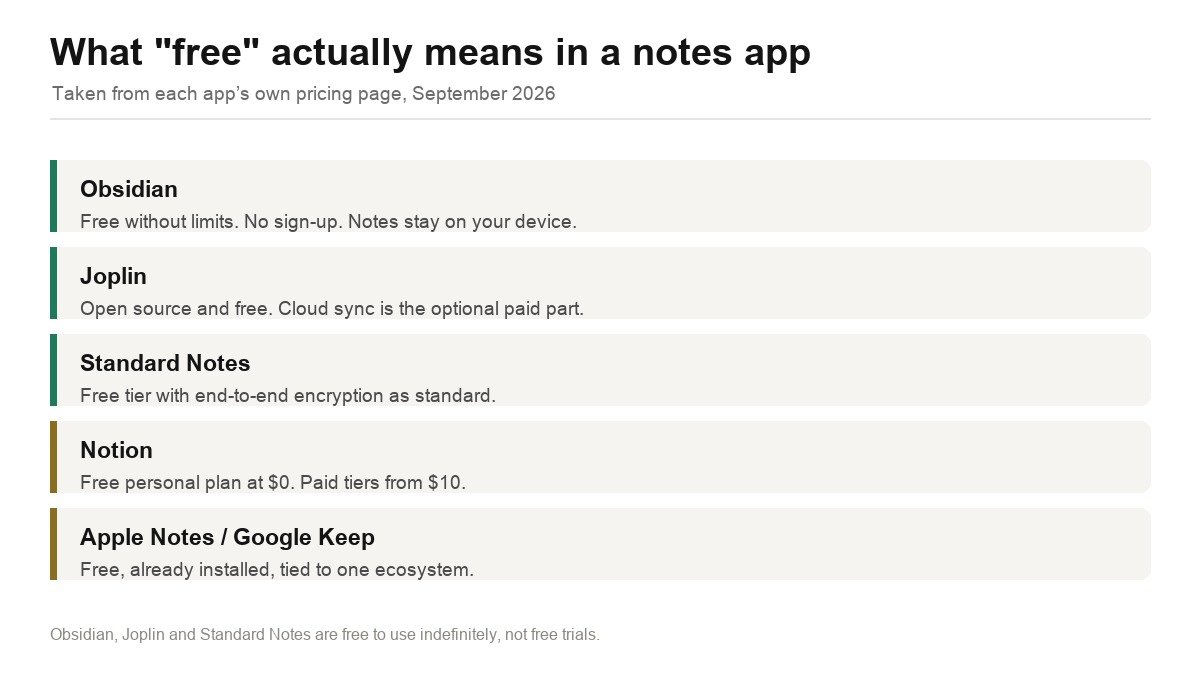
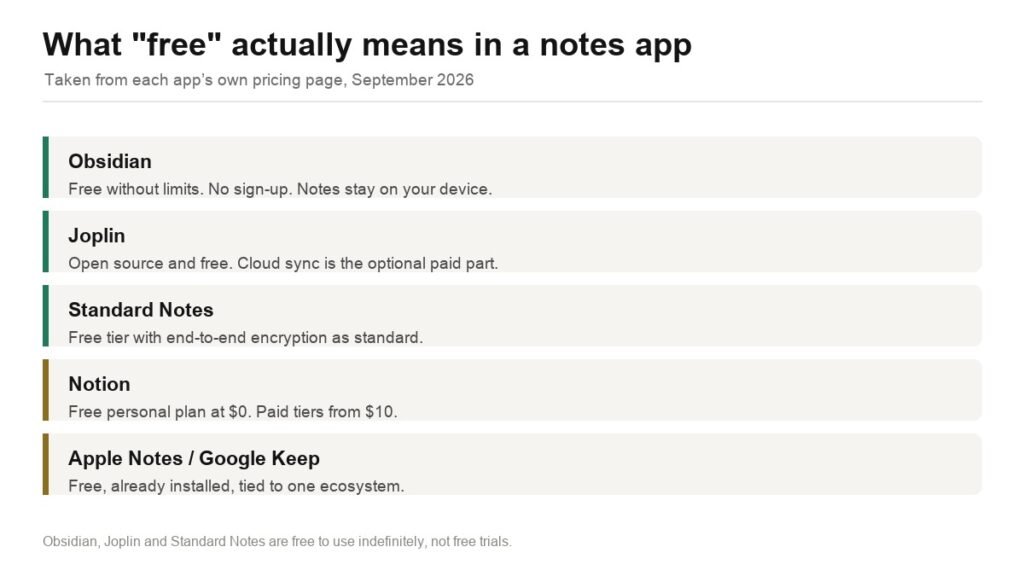
The distinction that matters is between an app that is free because the company sells something else, and an app that is free because there is nothing to sell you. Obsidian and Joplin are the second kind.
| App | Free tier | Where notes live | Paid add-on |
|---|---|---|---|
| Obsidian | Free without limits | Local files on your device | Sync $4/user/month annually |
| Joplin | Free and open source | Local, or your own sync target | Joplin Cloud from 4.79 EUR/month yearly |
| Standard Notes | Free tier | Encrypted on their servers | Paid plans listed at $90 and $120 |
| Notion | Free personal plan, $0 | Notion servers | Plus from $10/user/month |
| Apple Notes / Google Keep | Free | iCloud / Google account | Storage tier you already pay for |
1. Obsidian: Free Without Limits, and Your Notes Are Just Files
Obsidian states it plainly on its own pricing page: free without limits, no sign-up required, no strings attached. There is no free tier in the usual sense because there is no paid tier of the app itself.
The structural difference from Evernote is where the notes live. Obsidian writes plain Markdown files into a folder on your disk. You can open them in any text editor, back them up with any tool, and keep them if Obsidian disappears tomorrow. The company confirms your data is stored locally and inaccessible to them, that the apps collect no telemetry, and that they never sell user data.
Sync across devices is the optional paid part at $4 per user per month billed annually or $5 monthly, with AES-256 end-to-end encryption. Publishing notes to the web is $8 per site per month annually. Both carry a 7-day no-questions refund, and students, faculty and nonprofit employees get 40% off. You can also sync for nothing by putting the folder in iCloud, Dropbox or Syncthing, which is what a large share of users do.
What it does well
- Free without limits and without an account.
- Notes are plain Markdown files you own outright.
- No telemetry, and the company cannot read your data.
- Commercial use does not require a paid licence.
What to know
- No built-in sync unless you pay or configure your own.
- A blank, unopinionated app that takes setup effort.
- Web clipping is less polished than Evernote’s.
2. Joplin: Open Source, and the Closest Thing to Evernote’s Structure
Joplin is the alternative that feels most like Evernote, because it is built around notebooks and notes rather than a wiki of linked files. It is open source and free, and it imports Evernote ENEX exports directly, which makes it the least painful migration on this list.
Sync is where it differs from Obsidian. Joplin can sync through your own Dropbox, OneDrive, Nextcloud or WebDAV server at no cost, or through the official Joplin Cloud. Joplin Cloud’s Pro tier is listed at 5.99 EUR a month, or 4.79 EUR a month when billed yearly at 57.48 EUR, with a 200 MB limit per note or attachment and 30 GB of storage, upgradeable to 100 GB. End-to-end encryption is available on any sync target.
What it does well
- Open source and free, with no account required to start.
- Imports Evernote ENEX files directly.
- Syncs through your own Dropbox, OneDrive or Nextcloud for free.
- Notebook structure will feel familiar to Evernote users.
What to know
- The interface is more utilitarian than commercial apps.
- Joplin Cloud is priced in euros.
- Mobile apps lag the desktop version in polish.
3. Standard Notes: Free, With Encryption That Is Not Optional
Standard Notes starts from a different premise: every note is end-to-end encrypted by default, on the free tier as well as the paid ones. Where Evernote can read your notes and Notion can read your pages, Standard Notes cannot.
The free tier covers unlimited notes and syncing across devices, which is more than Evernote’s current free plan allows. Paid plans, listed at $90 and $120, add editors for Markdown and rich text, themes, file storage and longer revision history. The core trade is deliberate minimalism: the free experience is plain text, and the formatting people expect lives behind the subscription.
What it does well
- End-to-end encryption on every tier including free.
- Unlimited notes and device sync on the free plan.
- Open source clients and a published security model.
- Long-standing independent company focused on privacy.
What to know
- Free tier is plain text; rich editors are paid.
- Fewer organisational features than Evernote or Notion.
- Encryption means the company cannot recover a lost password.
4. Notion: Free for One Person, If You Want a Database Not a Notebook
Notion’s personal plan is $0 and it is not time-limited. Paid tiers start at $10 per user per month, with a business tier at $20 and an annual discount of up to 20%.
Whether it replaces Evernote depends on what you used Evernote for. If you kept meeting notes, project pages and structured lists, Notion is a substantial upgrade: its databases, views and templates do things Evernote never did. If you used Evernote as a place to dump web clippings and scanned receipts and search them later, Notion is slower and heavier at exactly that job. It is also fully cloud-hosted, so your notes are on Notion’s servers rather than your disk.
What it does well
- Genuinely free personal plan with no time limit.
- Databases, views and templates well beyond a notes app.
- Excellent collaboration if you later add people.
- Strong mobile and web apps.
What to know
- Notes live on Notion servers, not locally.
- Slower than a plain notes app for quick capture.
- No end-to-end encryption.
5. Apple Notes and Google Keep: Already Installed, Already Paid For
The option most people skip. If you are inside one ecosystem, the built-in notes app is free, syncs without configuration, and is backed by storage you already pay for. Apple Notes in particular has quietly become capable: folders, tags, document scanning, handwriting, shared notes and the ability to lock individual notes.
The limitation is the obvious one. Apple Notes is unusable on Windows and Android in any serious way, and Google Keep is deliberately lightweight, closer to sticky notes than to a knowledge base. If your devices are all from one maker and your needs are modest, this is the cheapest correct answer and it requires installing nothing.
What it does well
- Free, pre-installed and synced with no setup.
- Backed by iCloud or Google storage you already have.
- Apple Notes handles scanning, handwriting and locked notes.
- Nothing to migrate to or maintain.
What to know
- Locks you to one ecosystem.
- Google Keep is too simple for large note libraries.
- Limited export options if you later want to leave.
See Apple Notes guide
Getting Your Notes Out of Evernote
Export before you choose, because the export format determines which apps can take your library cleanly.
- In the Evernote desktop app, select a notebook, then export it as an ENEX file. Do this notebook by notebook rather than all at once, because very large exports fail more often.
- Check the exported file size against what Evernote reports for that notebook. Attachments are the usual casualty.
- Import the ENEX into Joplin directly, which preserves notebooks, tags and attachments. Obsidian needs a converter plugin, since ENEX is not Markdown.
- Open ten notes at random in the new app and confirm attachments, images and tables survived before you cancel anything.
- Keep the Evernote account alive, even on the free tier, until you are certain. Deleting it destroys the only remaining copy of anything that failed to export.
This is the step people rush. An ENEX export that silently drops PDF attachments looks fine until the month you need one.
Which Free Evernote Alternative to Choose
For most people leaving Evernote, Joplin is the softest landing. It is free and open source, it imports ENEX files directly so your library arrives intact, it keeps the notebook structure you are used to, and you can sync it through cloud storage you already have without paying anyone.
Choose Obsidian instead if you want your notes to outlive any company, because plain Markdown files in a folder on your disk are the most durable format there is, and the app is free without limits or an account. Choose Standard Notes if encryption is the point and you can live with plain text on the free tier. Choose Notion if what you actually wanted was a database rather than a notebook, and accept that your notes sit on their servers. And check Apple Notes first if every device you own has an Apple logo on it, because it costs nothing and you already have it.
If the reason you are leaving is that the subscriptions have piled up, the same audit is worth running on the rest of the stack. Our comparison of Dropbox alternatives covers the storage line item and the PDF editor guide covers three genuinely free options in a category most people overpay for.
Frequently Asked Questions
Is there a completely free alternative to Evernote?
Yes, several. Obsidian is free without limits and requires no sign-up. Joplin is free and open source. Standard Notes has a permanent free tier with end-to-end encryption. None of these is a trial that expires.
Can I import my Evernote notes into these apps?
Joplin imports Evernote ENEX exports directly, preserving notebooks, tags and attachments, which makes it the easiest migration. Obsidian needs a converter because it stores notes as Markdown files. Export notebook by notebook rather than in one large file.
Do I have to pay for Obsidian if I use it at work?
No. Obsidian states on its own pricing page that a commercial licence is not required, though it encourages organisations to buy one at $50 per user per year to keep the project user-supported.
Which free notes app keeps my notes private?
Obsidian stores notes locally on your device and states it cannot access them, with no telemetry collected. Standard Notes applies end-to-end encryption on every tier including free. Notion and the built-in ecosystem apps can read your notes on their servers.
Related Articles

Get the Fox Bulletin briefing
The stories that matter, in your inbox. No spam, unsubscribe anytime.
Newsletter signup will be available soon.
Related stories

Airbus A380: Size, Range and Who Still Flies It
The largest passenger aircraft ever flown measures 72.72 m long and 79.75 m across the wings. Its specifications, the two decks, why production ended at 251 aircraft, and which airlines still fly it.
Apple Creator Studio: Price and the New AI Tools
Generate Fill in Pixelmator Pro, an AI assistant in Logic Pro and MotionVFX in Final Cut. A free update for subscribers.

Apple Home Collection: Every Accessory and Price
Cameras, a smart lock and two thermostats, built by LG and Schneider Electric and sold by Apple.